
Chevrolet Sonic Repair Manual: Rear Seat Cushion Cover and Pad Replacement
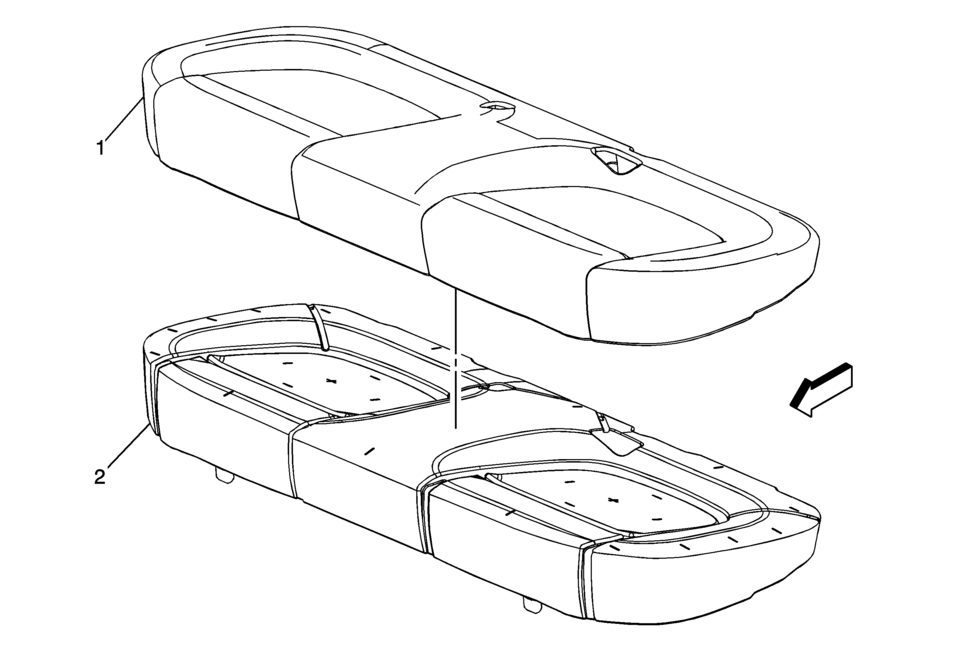
|
Callout |
Component Name |
|---|---|
|
Preliminary Procedure
Remove the rear seat cushion. Refer to Rear Seat Cushion Removal and Installation |
|
|
1 |
Rear Seat Cushion Cover Procedure
Note: When installing the rear seat cushion cover, pull the cover tightly in all corners to ensure that no creasing occurs. |
|
2 |
Rear Seat Cushion Pad |
 Rear Seat Center Shoulder Belt Replacement (Sedan)
Rear Seat Center Shoulder Belt Replacement
Callout
Component Name
Preliminary Procedures
Remove the rear seat cushion. Refer to ...
 Rear Seat Cushion Removal and Installation
Rear Seat Cushion Removal and Installation
Callout
Component Name
1
Rear Seat Cushion Replacement
Procedure
Relea ...
Other materials:
Wireless Communication Interface Antenna Replacement
Wireless Communication Interface Antenna Replacement
Callout
Component Name
Preliminary Procedure
Remove the communication interface module. Refer to
Communication Interface Module Replacement
1
...
Radio Antenna Base Replacement
Radio Antenna Base Replacement
Callout
Component Name
Preliminary Procedure
Lower the rear of the headlining trim panel. Refer to
Headlining Trim Panel Replacement.
1
Radio Antenna Base Fastener
...
Timing Belt Tensioner Replacement
Special Tools
EN-6333 Timing Belt Tensioner Locking Pin
EN-6340 Camshaft Locking Tool
EN-45059 Torque Angle Sensor Kit
For equivalent regional tools, refer to Special Tools.
Removal Procedure
Remove the air cleaner assembly. Refer to Air Cleaner Assembly Replacement.
...

0.0053