
Chevrolet Sonic Repair Manual: Rear Seat Head Restraint Guide Replacement
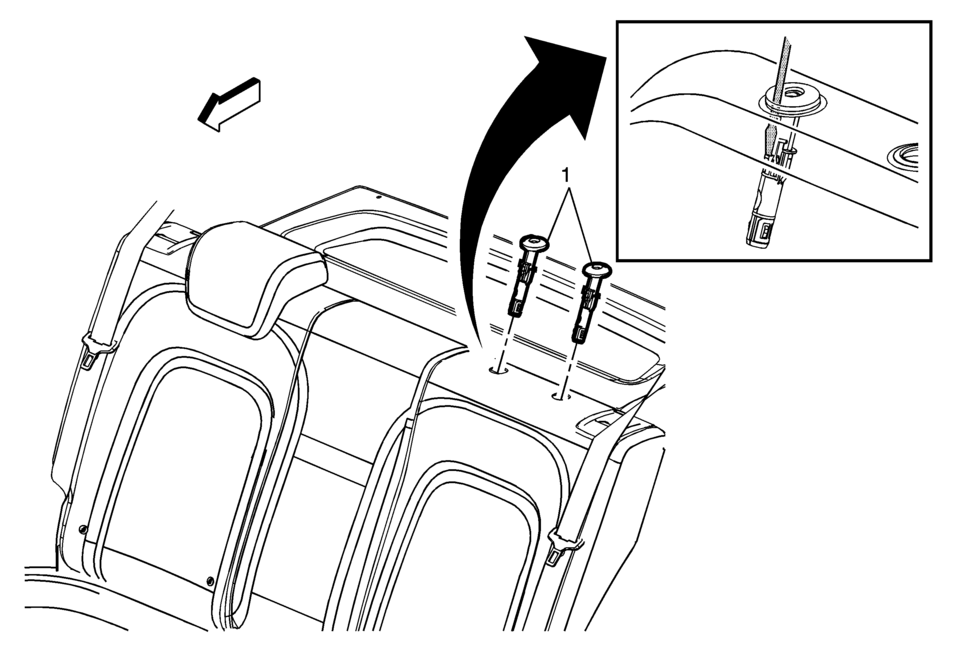
|
Callout |
Component Name |
|---|---|
|
Preliminary Procedure
Remove the rear seat head restraint. Refer to Rear Seat Head Restraint Replacement |
|
|
1 |
Rear Seat Head Restraint Guide Procedure
Using a suitable flat-bladed tool, slide the tool between the cushion and the guide until you find the slot on the outboard side of the guide. Push inward on the guide slot tab , while pulling upward to remove the guide from the seat back frame. |
 Head Restraint Adjustment
Do not drive until the head restraints for all occupants are installed and adjusted
properly.
To achieve a comfortable seating position, change the seatback recline angle
as little as necessary ...
 Rear Seat Head Restraint Replacement
Rear Seat Head Restraint Replacement
Callout
Component Name
1
Rear Seat Head Restraint
Preliminary Procedures
Dep ...
Other materials:
High-Beam Headlamp/ Low-Beam Headlamp
1. Open the hood. See Hood.
2. For the driver side bulb, remove the windshield washer bottle filler neck by
turning it one-quarter turn counterclockwise and pulling it straight up and out
of the bottle.
3. Remove the headlamp bulb access cover.
4. Turn the bulb counterclockwise and pull str ...
Front Seat Belt Guide Adjuster Replacement (with AHU)
Front Seat Belt Guide Adjuster Replacement
Callout
Component Name
Preliminary Procedures
Remove the center pillar upper trim panel. Refer to Center Pillar Upper
Trim Panel Replacement.
1
Driver ...
Vehicle identification
Vehicle Identification Number (VIN) plate
The VIN plate on your Nissan Armada is mounted as shown and serves as the primary
identifier for the vehicle. This number is essential for registration, insurance,
and service records.
Vehicle identification number (chassis number)
The chassis ...

0.0074