
Chevrolet Sonic Repair Manual: Rear Seat Outboard Seat Back Airbag Replacement
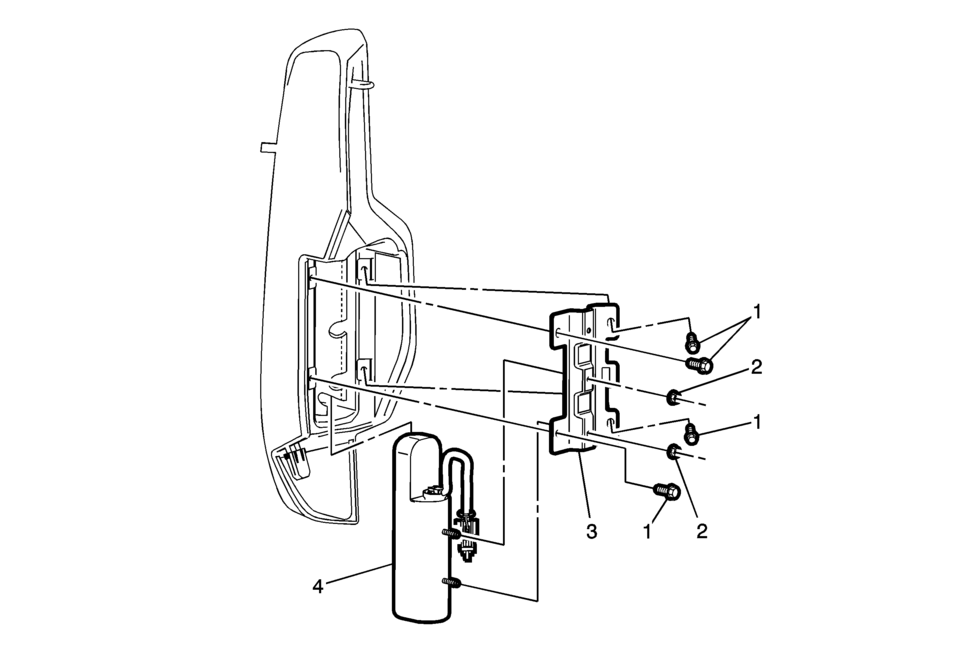
|
Callout |
Component Name |
|---|---|
|
Warning: Following the deployment of a rear seat side air bag, inspect the following parts for damage. Replace these parts if necessary:
Failure to do so may cause future personal injury.
|
|
|
1 |
Rear Seat Side Inflatable Restraint Module Bracket Bolt (Qty:?€‰4) Caution: Refer to Fastener Caution.
3.5?€‰Y (31?€‰lb?€‰in) |
|
2 |
Rear Seat Side Inflatable Restraint Module Nut (Qty:?€‰2) Caution: Refer to Fastener Caution.
3.5?€‰Y (31?€‰lb?€‰in) |
|
3 |
Rear Seat Side Inflatable Restraint Module Bracket |
|
4 |
Rear Seat Side Inflatable Restraint Module Procedure
|
 Rear Seat Latch Replacement
Rear Seat Latch Replacement
Callout
Component Name
Preliminary Procedures
Remove the rear seat back cushion. Refer to Rear Seat Bac ...
 Wipers, Washers
...
Other materials:
Hazard Warning Flashers
(Hazard Warning Flasher): Press
and momentarily hold this button to make the front and rear turn signal lamps flash
on and off. This warns others that you are having trouble. Press and momentarily
hold again to turn the flashers off. ...
Drive Range, First Gear Engine Braking (Gen 2)
Note: Some models of the 6T30/40/45/50 automatic transmission are equipped with
an electric auxiliary fluid pump for use in hybrid vehicles (BAS+). Hybrid vehicles
do not require internal combustion engine (ICE) operation at all times. After a
successful engine start, the hybrid powertrain con ...
Cockpit
Example
The cockpit of the Nissan Armada is engineered to provide maximum control, comfort,
and advanced driver assistance integration. Every switch and control element is
strategically positioned to ensure intuitive access, allowing the driver of the
Nissan Armada to stay focused on the ...

0.0056