
Chevrolet Sonic Repair Manual: Rear Side Door Check Link Replacement
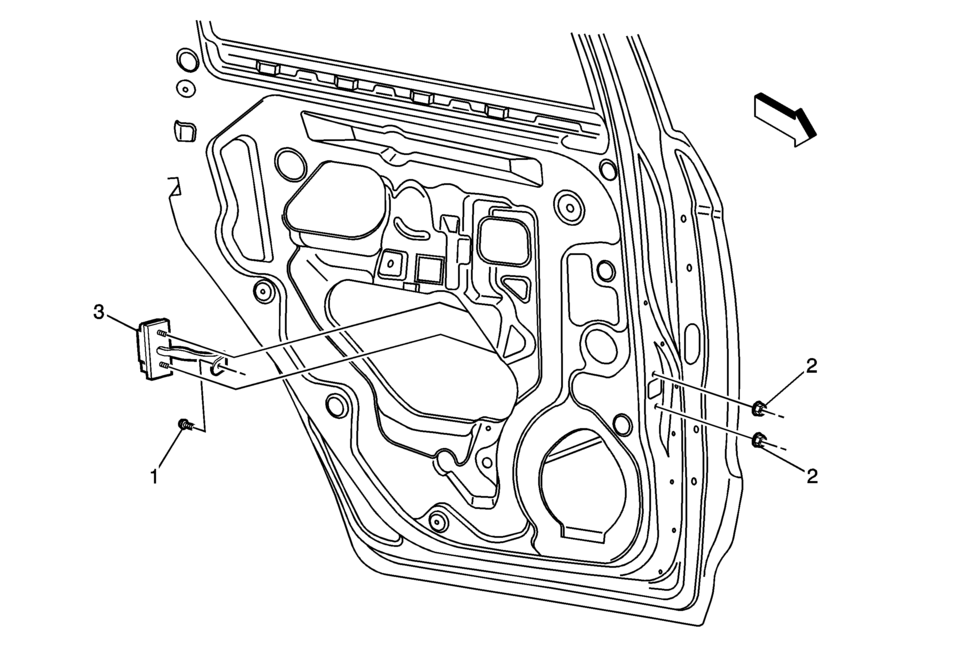
|
Callout |
Component Name |
|---|---|
Preliminary Procedures
|
|
|
1 |
Rear Side Door Check Link Bolt to Body Caution: Refer to Fastener Caution
22?€‰Y (16?€‰lb?€‰ft) |
|
2 |
Rear Side Door Check Link Nut (Qty:?€‰2) Procedure
Remove the water deflector. Tighten
5.5?€‰Y (49?€‰lb?€‰in) |
|
3 |
Rear Side Door Check Link Assembly |
 Rear Side Door Adjustment (4 Door Notch Back 69)
Rear Side Door Adjustment
Callout
Component Name
1
Rear Side Door
Caution: Refer to Fastener Caution.
Pr ...
 Rear Side Door Replacement
Rear Side Door Replacement
Callout
Component Name
Warning: Refer to SIR Warning.
Preliminary Procedures
Mark the l ...
Other materials:
Overview (Radio with CD/USB)
91011121314151617
O /VOL (Power/Volume)
Turns the system on or off and adjusts the volume.
Z (Eject)
Removes a disc from the CD slot.
Buttons 1−6
Radio: Saves and selects favorite stations.
AUX Port
3.5 mm (1/8 in) connection for external devices.
...
Throttle Body Heater Outlet Pipe Replacement (LUW)
Throttle Body Heater Outlet Pipe Replacement
Callout
Component Name
Preliminary Procedure
Drain the cooling system. Refer to Cooling System
Draining and Filling.
1
Engine Coolant Air Bleed Hose
...
Automatic Transmission (AT)
9 speed automatic transmission
The Nissan Armada is equipped with a sophisticated 9-speed automatic transmission
that is electronically managed by an advanced transmission control module. This
system is engineered to deliver optimal fuel efficiency, smooth gear transitions,
and responsive per ...

0.0066