
Chevrolet Sonic Repair Manual: Rear Side Door Replacement
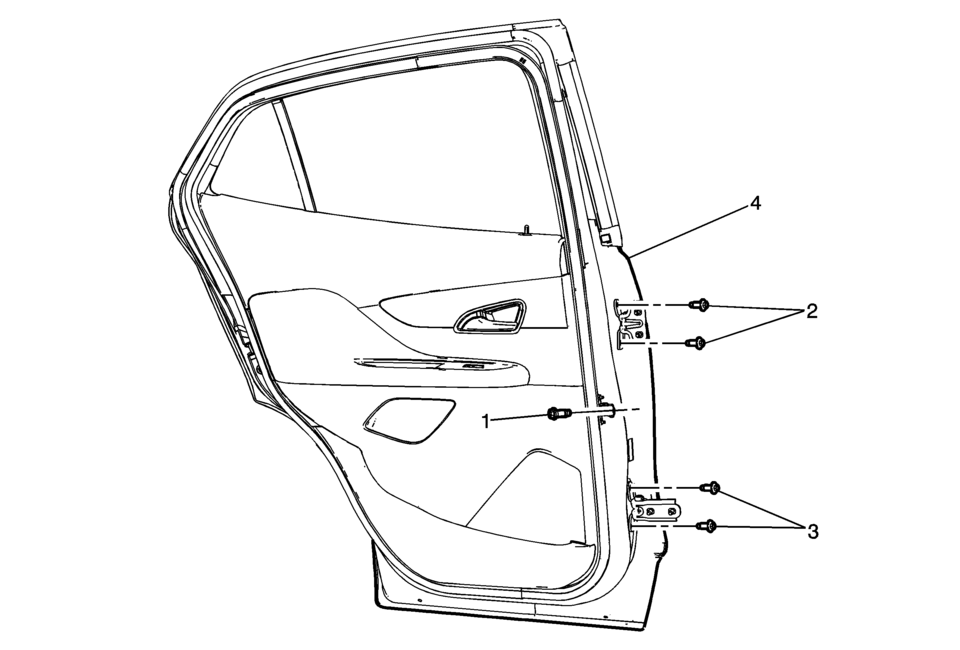
|
Callout |
Component Name |
|---|---|
|
Warning: Refer to SIR Warning.
|
|
|
1 |
Rear Side Door Check Link Bolt to Body Caution: Refer to Fastener Caution.
22?€‰Y (16?€‰lb?€‰ft) |
|
2 |
Rear Side Door Hinge Bolt to Door (Qty:?€‰2) Tighten
32?€‰Y (24?€‰lb?€‰ft) |
|
3 |
Rear Side Door Hinge Bolt to Door (Qty:?€‰2) Tighten
32?€‰Y (24?€‰lb?€‰ft) |
|
4 |
Rear Side Door Assembly Procedure
|
 Rear Side Door Outer Panel Replacement
Removal Procedure
Warning: Refer to Glass and Sheet Metal Handling Warning.
Note: According to different corrosion warranties, only the
regional mandatory joini ...
 Rear Side Door Stationary Window Replacement
Rear Side Door Stationary Window Replacement
Callout
Component Name
Warning: Refer to Glass and Sheet Metal Handling Warning.
...
Other materials:
Radio/Audio System Description and Operation
The entertainment system on this vehicle may have several different configurations
available to it. To determine the specific configuration of the vehicle, please
see the Service Parts ID Label, and refer to RPO Code List.
Each item in the list below represents topics covered in detail below. ...
Instrument Panel Tie Bar Replacement
Removal Procedure
Remove the Instrument panel assembly. Refer to Instrument Panel Assembly
Replacement.
Remove the steering column and wheel from the vehicle. Refer to Steering
Column Replacement.
Remove the air inlet grill panel. Refer to Air Inlet Grille Panel Replacem ...
Radiator Replacement (LDE LUW)
Radiator Replacement
Callout
Component Name
Preliminary Procedures
Drain the coolant. Refer to Cooling System Draining and Filling.
Remove the engine coolant temperature sensor.
Remove the air conditioning condenser. R ...

0.0047