
Chevrolet Sonic Repair Manual: Rear Side Door Trim Replacement (Sedan)
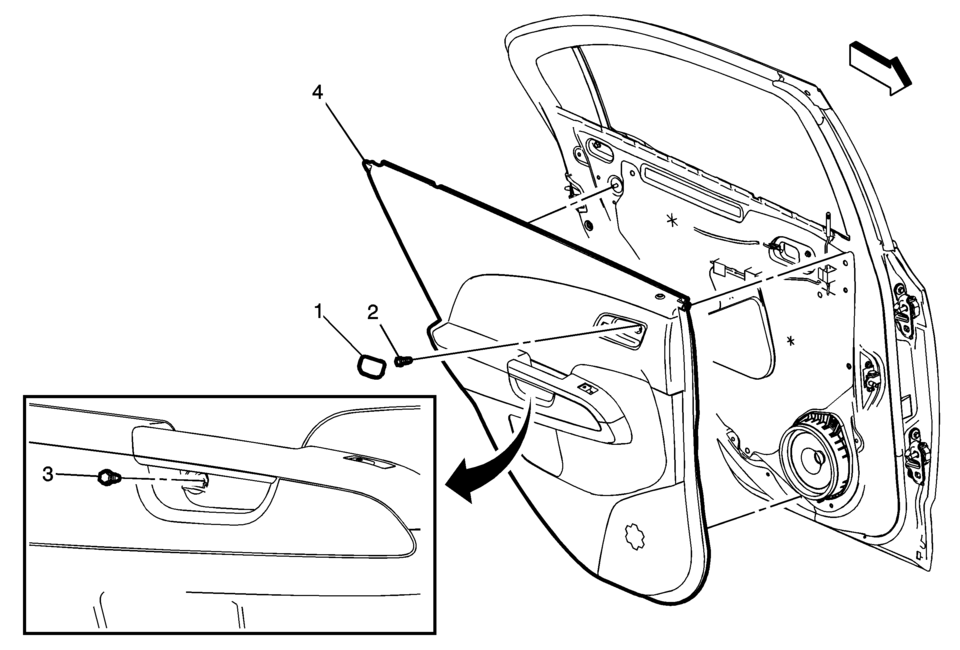
|
Callout |
Component Name |
|---|---|
|
1 |
Rear Side Door Inside Handle Bolt Cap |
|
2 |
Rear Side Door Inside Handle Fastener Caution: Refer to Fastener Caution. Procedure
Pull handle back to remove cap. Use suitable tool to unsnap. |
|
3 |
Rear Side Door Trim Fastener Procedure
Use a small flat-bladed tool to open the rear side door trim integral cap to access the fastener. |
|
4 |
Rear Side Door Trim Assembly Procedure
|
 Rear Side Door Trim Replacement (Hatchback)
Rear Side Door Trim Replacement
Callout
Component Name
Preliminary Procedure
Remove the rear side door upper rear trim panel. R ...
 Rear Side Door Upper Front Auxiliary Weatherstrip Retainer Replacement
Rear Side Door Upper Front Auxiliary Weatherstrip Retainer Replacement
Callout
Component Name
1
Front Side Door Upper Fr ...
Other materials:
Floor Mats
Warning
If a floor mat is the wrong size or is not properly installed, it can interfere
with the pedals. Interference with the pedals can cause unintended acceleration
and/or increased stopping distance which can cause a crash and injury. Make sure
the floor mat does not interfere with the pe ...
OnStar Overview
If equipped, this vehicle has a comprehensive, in-vehicle system that can connect
to a live Advisor for Emergency, Security, Navigation, Connection, and Diagnostic
Services.
The OnStar system status light is next to the OnStar buttons. If the status light
is:
Solid Green: System is ...
Engine Coolant Temperature Sensor Replacement - Radiator
Engine Coolant Temperature Sensor Replacement - Radiator
Callout
Component Name
Preliminary Procedure
Drain the cooling system. Refer to
Cooling System Draining and Filling.
Remove the right front wheelhouse liner. Ref ...

0.0055