
Chevrolet Sonic Repair Manual: Rear Wheel Bearing and Hub Replacement (Drum Brake)
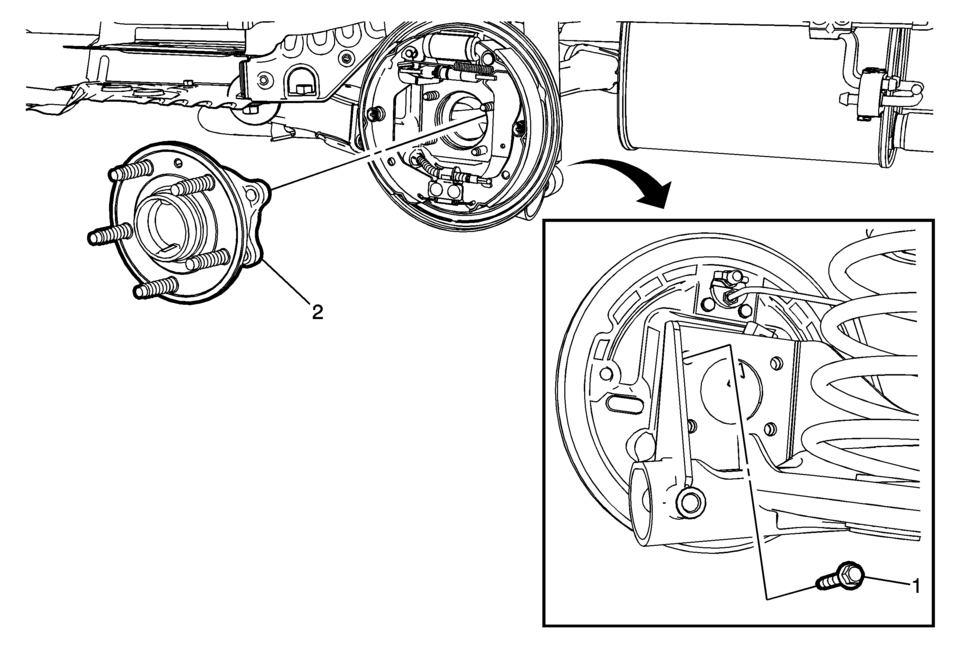
|
Callout |
Component Name |
|---|---|
Preliminary Procedures
|
|
|
1 |
Rear Wheel Bearing/Hub Mounting Bolt (Qty 4) Caution: Refer to Fastener Caution. Procedure
Remove the electrical connector for the rear wheel speed sensor. Tighten
58 Y (43 lb ft) |
|
2 |
Rear Wheel Bearing/Hub Assembly Procedure
Ensure that the rear wheel bearing/hub is properly aligned with the rear axle to allow access to the wheel speed sensor connector. |
 Rear Wheel Bearing and Hub Replacement (Disc Brake)
Special Tools
EN–45059 Angle Meter
For equivalent regional tools, refer to Special Tools.
Removal Procedure
Raise and suitably support the vehicle. Refer to Lifting and Jacking
...
 Tire and Wheel Assembly-to-Hub/Axle Flange Match-Mounting
Note: After remounting a tire and wheel assembly to a hub/axle flange,
remeasure the tire and wheel assembly on-vehicle runout in order to verify that
the amount of runout has been reduced an ...
Other materials:
Fog Lamps
For vehicles with front fog lamps, the button is on the outboard side of the
instrument panel.
The ignition must be on to turn on the fog lamps.
(Fog Lamps): Press to turn the
fog lamps on or off. An indicator light on the instrument cluster comes on when
the fog lamps are on.
The fog la ...
Special Tools
Illustration
Tool Number/Description
BO-49385
BO-6626
KM-6626
S0201912
Wiper Arm Puller
...
Ignition Coil Installation
Special Tools
EN-6009 Remover and Installer Ignition Module
For equivalent regional tools, refer to Special Tools.
Install the ignition coil (1) and remove EN-6009 remover and installer
(2).
Caution: Refer to Fastener Caution.
Install the 2 ...

0.0048