
Chevrolet Sonic Owner's Manual: Removing the Spare Tire and Tools
The compact spare tire and tools are located in the storage compartment in the rear of the vehicle. The jack and tools are stored below the spare tire.
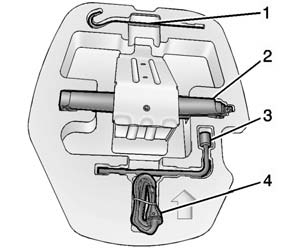
1. Extension
2. Jack
3. Wheel Wrench
4. Strap
To access the spare tire and tools:
1. Open the trunk or liftgate. See Trunk (Sedan) or Liftgate (Hatchback).
2. Lift the trim cover.
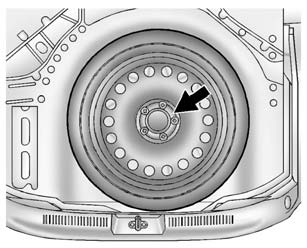
3. Turn the retainer counterclockwise and remove it from the compact spare.
4. Remove the compact spare tire. See Compact Spare Tire for more information.
5. Remove the jack and tools from their container and place them near the tire being changed.
 Tire Changing
...
 Removing the Flat Tire and Installing the Spare Tire
1. Do a safety check before proceeding. See If a Tire Goes Flat.
2. Remove the wheel cover, if the vehicle has one, to reach the wheel bolts.
3. Turn the wheel nuts counterclockwise to loosen th ...
Other materials:
Tire Pressure Monitor
This vehicle may have a Tire Pressure Monitor System (TPMS).
The low tire pressure warning light alerts to a significant loss in pressure
of one of the vehicle's tires. If the warning light comes on, stop as soon as possible
and inflate the tires to the recommended pressure shown on the T ...
Emergency Trunk Release Handle
Caution
Do not use the emergency trunk release handle as a tie-down or anchor point
when securing items in the trunk as it could damage the handle.
There is a glow-in-the-dark emergency trunk release handle on the underside of
the trunk lid. This handle will glow following exposure to light. ...
Radiator Grille Bumper Replacement
Radiator Grille Bumper Replacement
Callout
Component Name
Preliminary Procedure
Remove the front bumper fascia. Refer to Front Bumper Fascia Replacement.
1
Radiator Grille Bumper Screw (Qty:?ۉ ...

0.0083