
Chevrolet Sonic Owner's Manual: Safety Locks
The rear door safety locks prevent passengers from opening the rear doors from inside the vehicle.
Manual Safety Locks
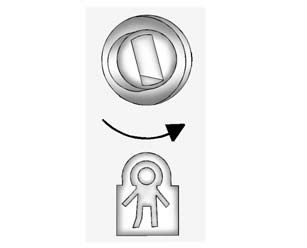
If equipped, the safety lock is located on the inside edge of the rear doors. To use the safety lock:
1. Insert the key into the safety lock slot and turn it so the slot is in the horizontal position.
2. Close the door.
3. Do the same for the other rear door.
To open a rear door when the safety lock is on:
1. Unlock the door by lifting the rear door lock, using the power door lock switch, or with the Remote Keyless Entry (RKE) transmitter.
2. Open the door from the outside.
To cancel the safety lock:
1. Unlock the door and open it from the outside.
2. Insert the key into the safety lock slot and turn it so the slot is in the vertical position.
3. Do the same for the other rear door.
 Lockout Protection
If the driver side power door lock switch is pressed when the driver door is
open and the key is in the ignition, all of the doors will lock and then the driver
door will unlock.
If Unlocked Door ...
 Doors
Doors
...
Other materials:
Door Locks
Warning
Unlocked doors can be dangerous.
Passengers, especially children, can easily open the doors and fall out
of a moving vehicle. When a door is locked, the handle will not open it. The
chance of being thrown out of the vehicle in a crash is increased if the doors
are not locked. S ...
Air Conditioning Evaporator Thermal Expansion Valve Replacement
Air Conditioning Evaporator Thermal Expansion Valve Replacement
Callout
Component Name
Preliminary Procedure
Recover the refrigerant. Refer to Refrigerant Recovery and Recharging.
Remove the air conditioning evaporator hos ...
Basic information
WARNING
Failure to carefully follow all warnings and operating instructions related
to the I-FCW system in the Nissan Armada may lead to serious injury or even fatal
accidents.
The Intelligent Forward Collision Warning system in the Nissan Armada
is designed to provide early alerts befor ...

0.0049