
Chevrolet Sonic Owner's Manual: Steering Wheel Controls
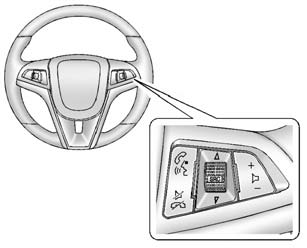
Some audio steering wheel controls could differ depending on the vehicle's options. Some audio controls can be adjusted at the steering wheel.
 /
/
 (Push to Talk): For vehicles with Bluetooth
or OnStar, press to interact with those systems. See Bluetooth (Voice Recognition) or Bluetooth (Overview) or Bluetooth (Infotainment Controls) or OnStar Overview.
 /
/
 (Mute/End Call): Press to reject an
incoming call, or end a current call. Press to silence the vehicle speakers while
using the infotainment system. Press again to turn the sound on.
For vehicles with OnStar or Bluetooth systems, press to reject an incoming call, or end a current call.
 SRC
SRC
 (Source): Press to select an audio
source.
Use to toggle up or down to select the next or previous favorite radio station or CD/MP3 track.
 (Volume): Press + or − to increase
or decrease the volume.
 Steering Wheel Adjustment
To adjust the steering wheel:
1. Pull the lever down.
2. Move the steering wheel up, down, forward, and backward.
3. Pull the lever up to lock the steering wheel in place.
Do not adjust the stee ...
 Horn
Horn
Press on the steering wheel pad
to sound the horn. ...
Other materials:
Infotainment
Determine which radio the vehicle has and read the following pages to become
familiar with its features.
Warning: Taking your eyes off the road for extended periods could
cause a crash resulting in injury or death to you or others. Do not give extended
attention to infotainment tasks wh ...
Camshaft Timing Chain Installation
Special Tools
EN-952 Fixing Pin
EN-953-A Fixing Tool
EN-955-10 Fixing Pin from EN-955 Kit
For equivalent regional tools, refer to Special Tools.
The engine should be adjusted to TDC.
The crankshaft should be locked with EN-952 fixing pin.
The camshaft should be locked with EN-9 ...
Spark plugs
Basic information
WARNING
Ensure the engine is off, the ignition is switched off, and the parking brake
is securely engaged before servicing spark plugs in your Nissan Armada.
CAUTION
Always use the correct socket when removing spark plugs from your Nissan Armada
to avoid damaging the compon ...

0.0055