
Chevrolet Sonic Repair Manual: Stop and Turn Signal Lamp Bulb Replacement (Sedan)
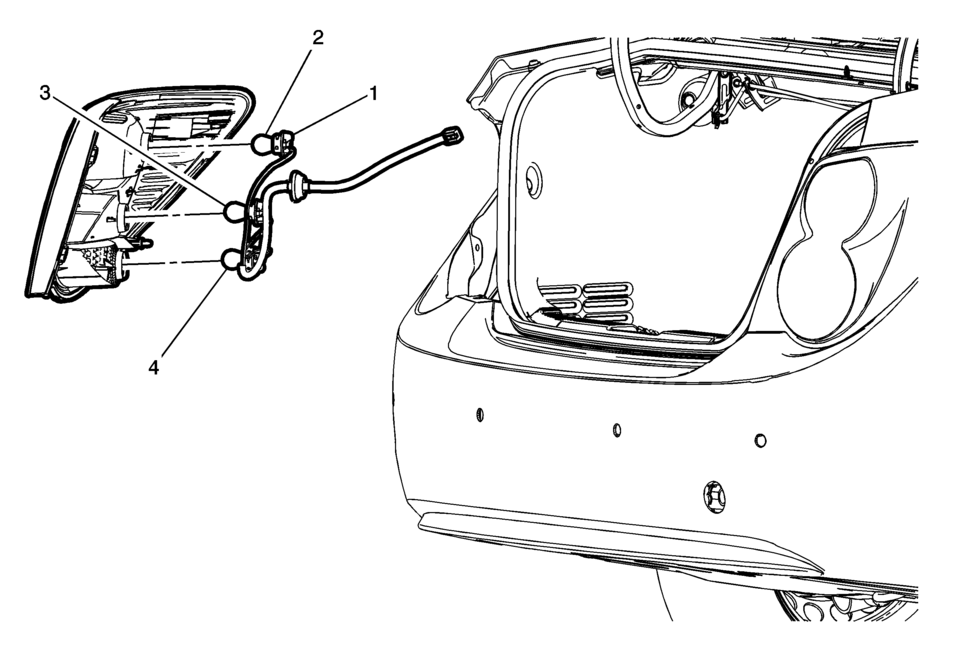
|
Callout |
Component Name |
|---|---|
|
Preliminary Procedure
Remove the tail lamp assembly. Refer to Tail Lamp Replacement. |
|
|
1 |
Tail Lamp Socket Procedure
Rotate the lamp socket counter-clockwise and remove the socket from the lamp housing. |
|
2 |
Park and Stop Lamp Bulb Procedure
Push the bulb inward while rotating counter-clockwise to remove. |
|
3 |
Turn Signal Bulb |
|
4 |
Back Up Bulb |
 Replacement Bulbs
Exterior Lamp
Bulb Number
Back-Up Lamp
921
Front Fog Lamp
H8
Front Parking/Turn S ...
 Taillamps, Turn Signal, Stoplamps, and Back-Up Lamps
Sedan Taillamp Shown, Hatchback Taillamp Similar
Back-up Lamp
Turn Signal Lamp
Stop Lamp/Taillamp
Sidemarker Lamp
To replace one of these bulbs:
Open the trunk.
Remove the t ...
Other materials:
Brake Rotor/Drum Balance Inspection
Support the vehicle drive axle on a suitable hoist. Refer to Lifting and
Jacking the Vehicle.
Remove the tire and wheel assemblies from the drive axle. Refer to Tire
and Wheel Removal and Installation.
Warning: Refer to Work Stall Test Warning.
Reinstall the wheel nuts in ...
The C300 competes well on fuel economy
Title: "2023 Mercedes-Benz C300: A Detailed Look at Efficiency, Interior, and Customization Options"
The 2023 Mercedes-Benz C300 presents a compelling choice for luxury sedan enthusiasts, offering a blend of performance, efficiency, and customizable features. Here's a breakdown of wh ...
Memory seat
Basic information
The Nissan Armada memory seat system is designed to enhance comfort and personalization
by allowing drivers to store and recall their preferred driving positions effortlessly.
This advanced Nissan Armada feature includes:
Memory storage function
User profile linking to st ...

0.0084