
Chevrolet Sonic Owner's Manual: Sunroof
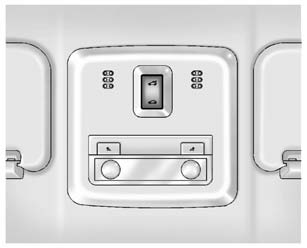
On vehicles with this feature, the sunroof only operates when the ignition is turned to ON/RUN or Retained Accessory Power (RAP) is active.
Open/Close: To open the sunroof, press and hold the rear of the switch. To close the sunroof, press and hold the front of the switch.
Vent: Press and hold the front of the switch to vent the sunroof.
Manually close the sunshade.
The sunroof will not operate if the vehicle has an electrical failure.
See Sunroof.
 Power Outlets
The accessory power outlets can be used to plug in electrical equipment, such
as a cell phone or MP3 player.
The vehicle has an accessory power outlet in front of the cupholders on the center
flo ...

Other materials:
Emergency Trunk Release Handle
Caution
Do not use the emergency trunk release handle as a tie-down or anchor point
when securing items in the trunk as it could damage the handle.
There is a glow-in-the-dark emergency trunk release handle on the underside of
the trunk lid. This handle will glow following exposure to light. ...
Front Side Door Outer Panel Replacement
Removal Procedure
Note: According to different corrosion warranties, only the regional
mandatory joining methods are allowed.
Disable the SIR System. Refer to SIR Disabling and Enabling.
Disconnect the negative battery cable. Refer to Battery Negative Cable
Disconn ...
RAB system operation
Vehicle information display
RAB system warning indicator (vehicle information display)
RAB system OFF warning light (instrument panel)
Steering-wheel-mounted controls (right side)
Touch screen display
The Nissan Armada RAB system becomes active when the transmission is shifted
in ...

0.0054