
Chevrolet Sonic Repair Manual: Throttle Body Installation
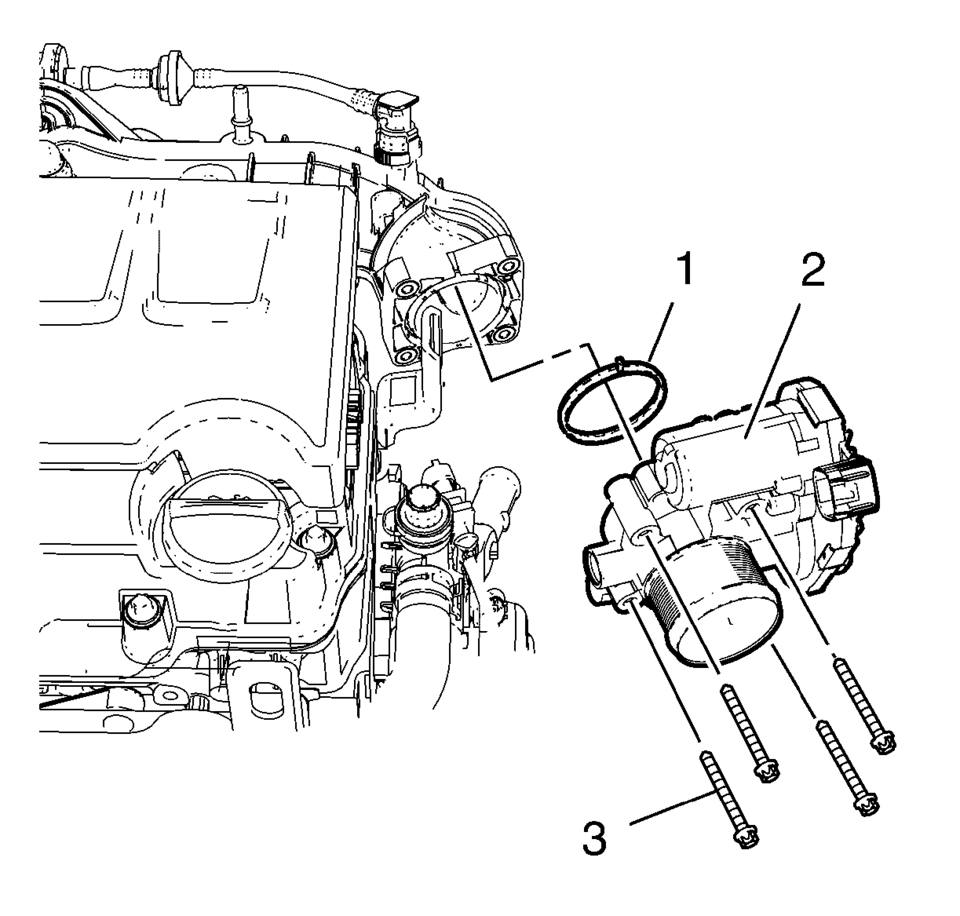
- Install the throttle body (2) and a NEW throttle body seal ring (1).
- Install the 4 throttle body bolts (3) and tighten to
8 Y (71 lb in)
.
Caution:
Refer to Fastener Caution.
 Throttle Body Inspection and Cleaning
Note: Over extended time and mileage, deposits may accumulate on the
back of the throttle valve plate. The source of the deposit is exhaust gas.
Typically these deposits pose no problem. Occa ...
 Throttle Body Removal
Remove the 4 throttle body bolts (3).
Remove the throttle body (2) and the throttle body seal
ring (1).
...
Other materials:
Windows
Manual Windows
If equipped, use the window crank to open and close each window.
See Manual Windows.
Power Windows
If equipped, press the switch down to open the window. Pull the front of the
switch up to close it.
The switches work when the vehicle is in ON/RUN or ACC/ ACCESSORY, or when Re ...
Front Bumper Fascia Center Support Bracket Replacement
Front Bumper Fascia Center Support Bracket Replacement
Callout
Component Name
Preliminary Procedure
Remove the front bumper fascia. Refer to Front Bumper Fascia Replacement.
1
Front Bumper Fascia ...
Stabilizer Shaft Replacement
Removal Procedure
Remove the intermediate steering shaft lower bolt. Refer to Intermediate
Steering Shaft Replacement.
Raise and support the vehicle. Refer to Lifting and Jacking the Vehicle.
Remove the tire and wheel assembly. Refer to Tire and Wheel Removal
and Inst ...

0.006