
Chevrolet Sonic Repair Manual: Timing Belt Center Front Cover Removal
- Remove the center front timing belt cover from the rear timing belt cover at 2 locations.
- Remove the center front timing belt cover (1).
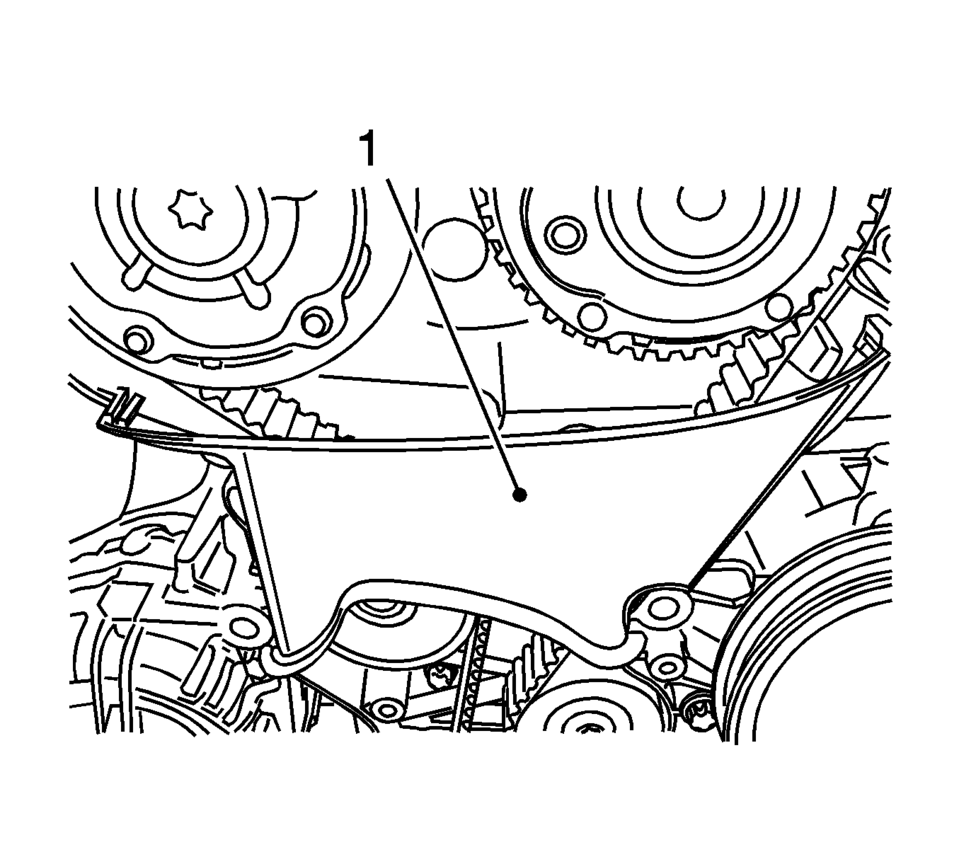
 Timing Belt Center Front Cover Installation
Install the timing belt center front cover (1) to the timing belt rear cover
at 2 locations. ...
 Timing Belt Center Front Cover Replacement
Timing Belt Center Front Cover Replacement
Callout
Component Name
Preliminary Procedure
Remove the timing belt upper front cover. R ...
Other materials:
Luggage/Load Locations
Load Compartment (Hatchback)
The load compartment cover can be used to conceal objects under it or removed
and placed on the bottom of the load compartment to carry larger loads.
To remove the load compartment cover:
1. Lift up on the load compartment cover and pull out.
2. Store the load comp ...
Windshield Side Garnish Molding Replacement
Windshield Side Garnish Molding Replacement
Callout
Component Name
Preliminary Procedures
Disable the SIR system, if equipped. Refer to SIR Disabling and Enabling.
1
Windshield Side Garnish Moldi ...
Outside Rearview Mirror Replacement (Power)
Outside Rearview Mirror Replacement
Callout
Component Name
Preliminary Procedures
Remove the front side door upper front trim panel. Refer to Front
Side Door Upper Front Trim Panel Replacement.
Remove the outside rearview ...

0.0074