
Chevrolet Sonic Repair Manual: Timing Belt Rear Cover Installation
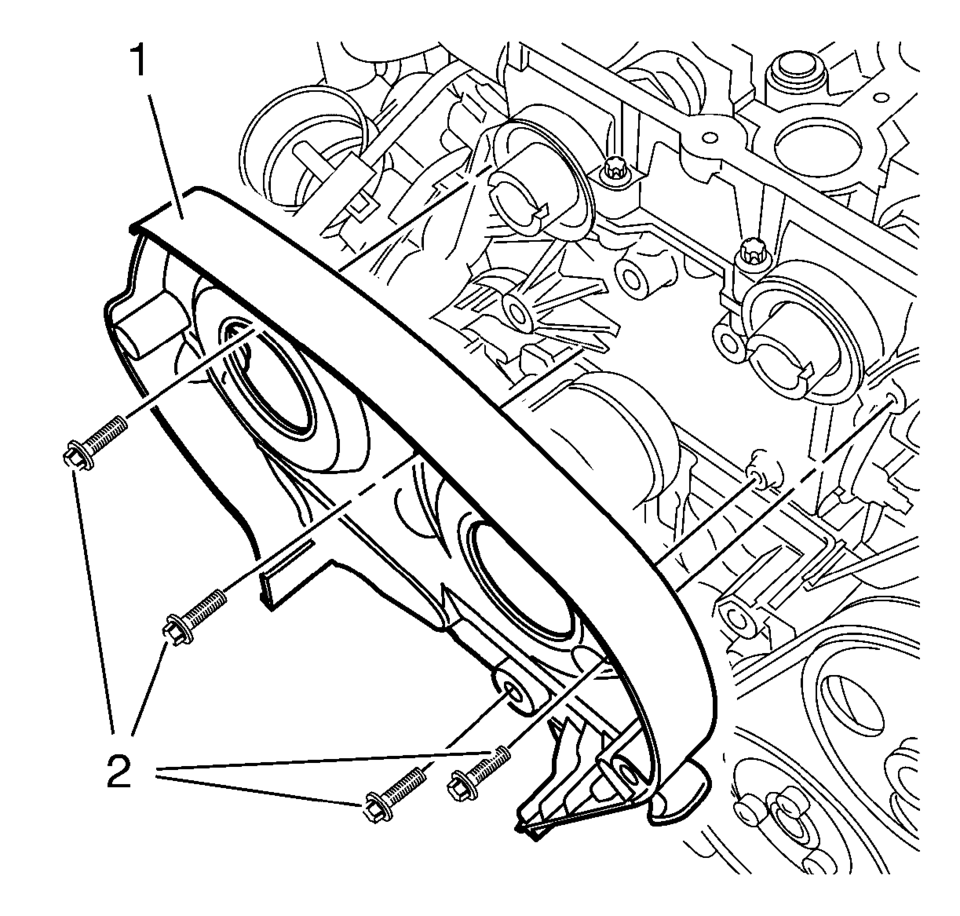
- Re-cut the 4 rear timing belt cover threads.
- Install the timing belt rear cover (1).
- Install the 4 NEW timing belt rear cover bolts (2) and tighten to 6 Y
(53 lb in)
.
Caution:
Refer to Fastener Caution.
Note:
Service may offer bolts that are not microencapsulated. If this is the case apply thread lock agent to the bolt. If fastener is microencapsulated, install a NEW 4 timing belt rear cover bolts. DO NOT reuse the old bolt.
 Timing Belt Lower Front Cover Replacement
Timing Belt Lower Front Cover Replacement
Callout
Component Name
Preliminary Procedures
Remove the front wheelhouse liner inner fro ...
 Timing Belt Rear Cover Removal
Remove and DISCARD the 4 timing belt rear cover bolts (2).
Remove the timing belt rear cover (1).
...
Other materials:
Rear Side Door Lock Cylinder Opening Cover Replacement
Rear Side Door Lock Cylinder Opening Cover Replacement
Callout
Component Name
1
Rear Side Door Lock Cylinder Opening Cover
Procedure
Remove the rear side door lock cylinder, Do Not
remove the outside door han ...
Camshaft Position Actuator Adjuster Installation
Special Tools
EN-6340 Camshaft Adjuster Locking Tool
EN-6628-A Camshaft Locking Tool
EN-45059 Angle Meter
For equivalent regional tools, refer to Special Tools.
Note: Note the arrows.
Turn the camshaft by the hexagon until the groove on the end of the camshafts
is ...
Neutral - Engine Running (Gen 1)
When the gear selector is moved to the Neutral (N) position, the hydraulic and
electrical system operation is identical to Park (P) range. However, if Neutral
is selected after the vehicle was operating in Reverse (R), the normally-high 35R
pressure control solenoid 2 is commanded OFF and the ...

0.005