
Chevrolet Sonic Repair Manual: Timing Belt Rear Cover Removal
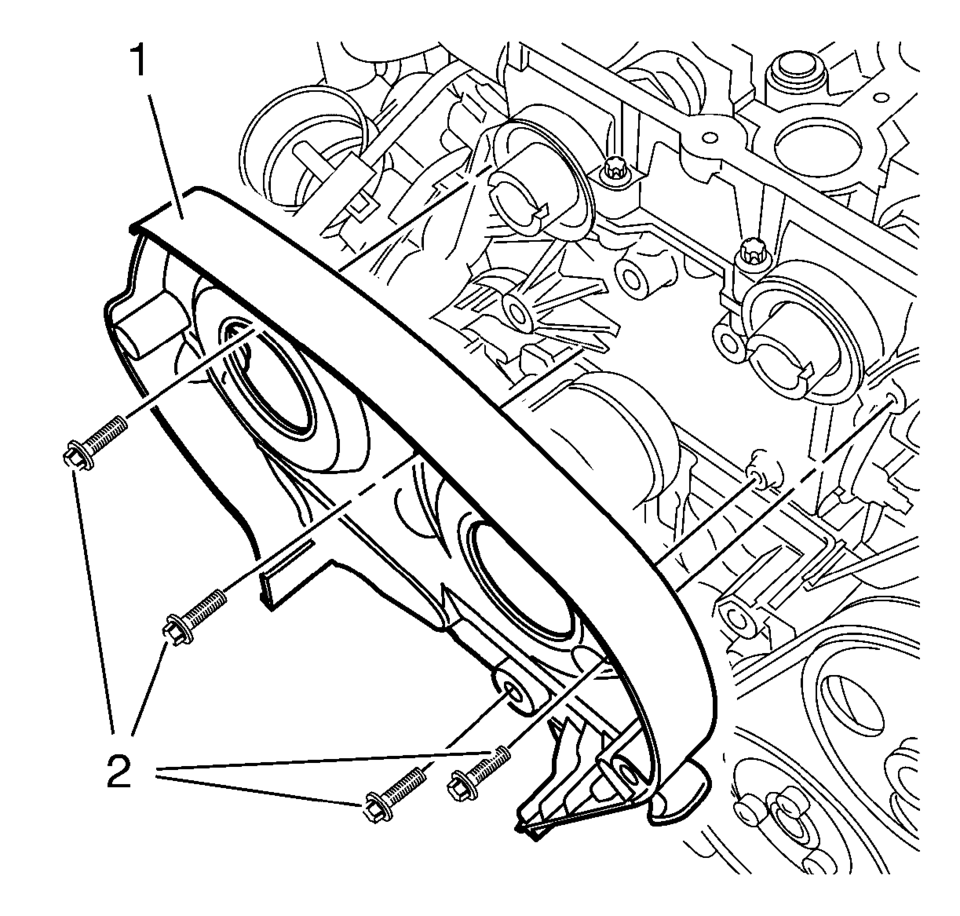
- Remove and DISCARD the 4 timing belt rear cover bolts (2).
- Remove the timing belt rear cover (1).
 Timing Belt Rear Cover Installation
Re-cut the 4 rear timing belt cover threads.
Install the timing belt rear cover (1).
Caution: Refer to Fastener Caution.
Note: Service may offer bolts that are n ...
 Timing Belt Rear Cover Replacement
Timing Belt Rear Cover Replacement
Callout
Component Name
Preliminary Procedures
Remove the camshaft sprocket. Refer to Camshaf ...
Other materials:
Finish Care
Application of aftermarket clearcoat sealant/wax materials is not recommended.
If painted surfaces are damaged, see your dealer to have the damage assessed and
repaired. Foreign materials such as calcium chloride and other salts, ice melting
agents, road oil and tar, tree sap, bird droppings, ...
Rear Seat Back Cushion Removal and Installation (40%)
Rear Seat Back Cushion Removal and Installation
Callout
Component Name
Preliminary Procedure
Remove the rear seat cushion. Refer to Rear Seat Cushion Removal
and Installation.
Remove the rear seat back cushion bolster. Re ...
Steering Linkage Inner Tie Rod Inspection
Special Tools
GE-8001 Dial Indicator Set
For equivalent regional tools, refer to Special Tools.
Note: This inspection procedure does not supersede local government
required inspections that have more stringent requirements.
Turn the ignition key to the ON position with the eng ...

0.0072