
Chevrolet Sonic Repair Manual: Timing Belt Upper Front Cover Installation
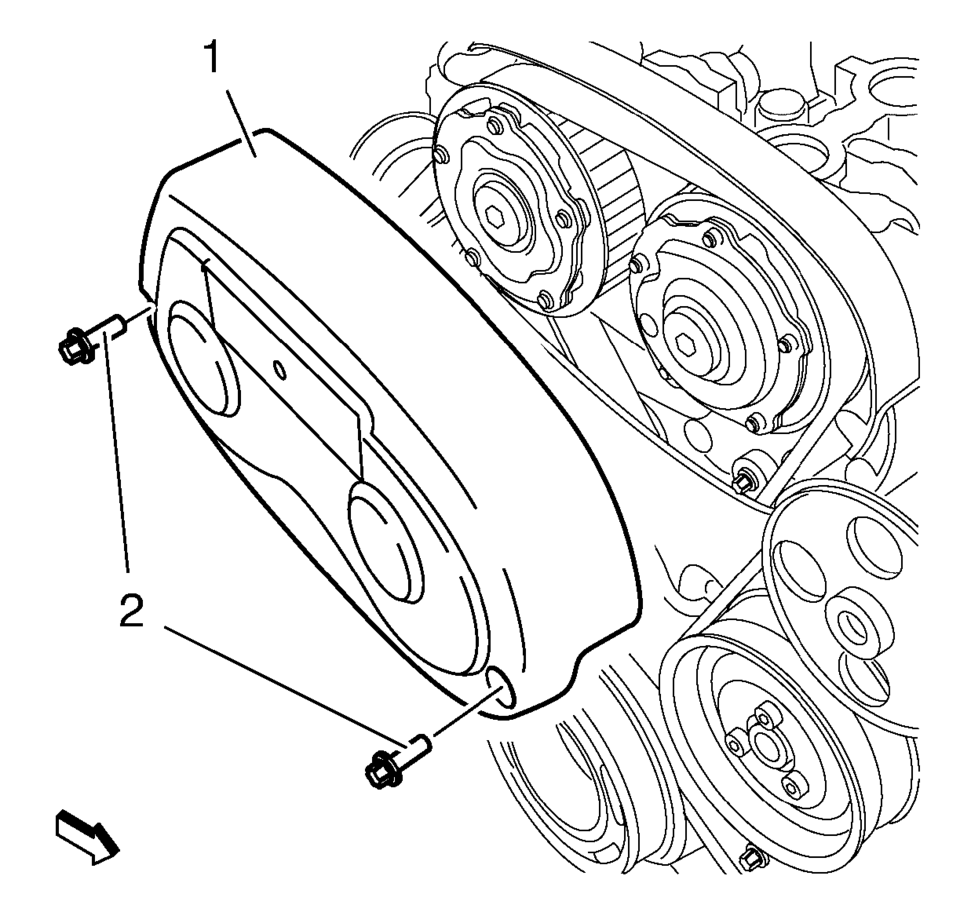
- Install the timing belt upper front cover (1).
- Install the 2 timing belt upper front cover bolts (2) and tighten to
6 Y(53 lb in)
.
Caution:
Refer to Fastener Caution.
 Timing Belt Replacement
Special Tools
EN-6333 Timing Belt Tensioner Locking Pin
EN-6340 Camshaft Locking Tool
For equivalent regional tools, refer to Special Tools.
Removal Procedure
Note: If the ...
 Timing Belt Upper Front Cover Removal
Remove the 2 timing belt upper front cover bolts (2).
Remove the timing belt upper front cover (1).
...
Other materials:
Front Seat Outboard Seat Back Airbag Replacement
Front Seat Outboard Seat Back Airbag Replacement
Callout
Component Name
Warning: Following the deployment of a side impact air bag,
inspect the following parts for damage. Replace these parts if necessary:
...
Disc Brake System Description and Operation
System Component Description
The disc brake system consists of the following components:
Disc Brake Pads
Applies mechanical output force from the hydraulic brake calipers to
friction surfaces of brake rotors.
Disc Brake Rotors
Uses mechanical output force ap ...
Towing recommended by NISSAN
Four-wheel drive models
Four-wheel Drive (4WD) models
For the Nissan Armada equipped with four-wheel drive, the manufacturer strongly
recommends transporting the vehicle using towing dollies or, preferably, a flatbed
truck to ensure maximum protection of drivetrain components.
Using the c ...

0.0059