
Chevrolet Sonic Repair Manual: Timing Belt Upper Front Cover Removal
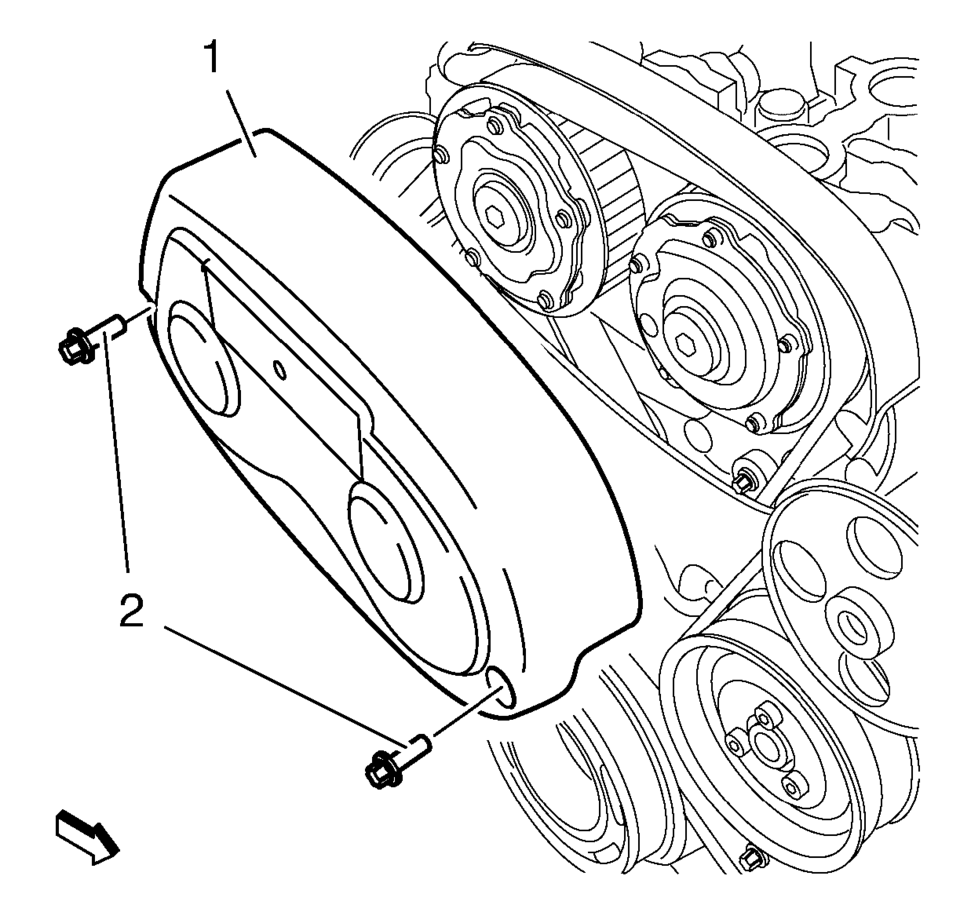
- Remove the 2 timing belt upper front cover bolts (2).
- Remove the timing belt upper front cover (1).
 Timing Belt Upper Front Cover Installation
Install the timing belt upper front cover (1).
Caution: Refer to Fastener Caution.
Install the 2 timing belt upper front cover bolts (2) and tighten to ...
 Timing Belt Upper Front Cover Replacement
Timing Belt Upper Front Cover Replacement
Callout
Component Name
1
Timing Belt Upper Front Cover Fastener (Qty: 2) ...
Other materials:
Doing Your Own Service Work
Warning
It can be dangerous to work on your vehicle if you do not have the proper
knowledge, service manual, tools, or parts. Always follow owner manual procedures
and consult the service manual for your vehicle before doing any service work.
If doing some of your own service work, use the pro ...
Front Fog Lamp Bulb Replacement
Front Fog Lamp Bulb Replacement
Callout
Component Name
Preliminary Procedure
Remove either the left front or right front wheelhouse liner. Refer
to Front Wheelhouse Liner Replacement.
Disconnect the electrical connector t ...
Vehicle Speed Sensor Replacement
Vehicle Speed Sensor Replacement
Callout
Component Name
1
Engine Wiring Harness Bracket Nut
Caution: Refer to Fastener Caution.
Tighten
9 Y (80 lb in)
2
...

0.0082