
Chevrolet Sonic Owner's Manual: Tire and Loading Information Label
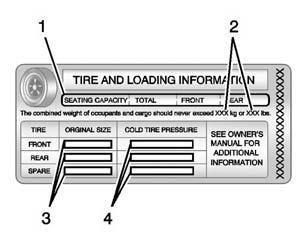
A vehicle-specific Tire and Loading Information label is attached to the vehicle's center pillar (B-pillar). The Tire and Loading Information label shows the number of occupant seating positions (1), and the maximum vehicle capacity weight (2) in kilograms and pounds.
The Tire and Loading Information label also shows the tire size of the original equipment tires (3) and the recommended cold tire inflation pressures (4). For more information on tires and inflation see Tires and Tire Pressure.
There is also important loading information on the Certification label. It tells you the Gross Vehicle Weight Rating (GVWR) and the Gross Axle Weight Rating (GAWR) for the front and rear axle. See “Certification Label� later in this section.
 Vehicle Load Limits
It is very important to know how much weight the vehicle can carry. This weight
is called the vehicle capacity weight and includes the weight of all occupants,
cargo, and all nonfactory-installed ...
 Steps for Determining Correct Load Limit
1. Locate the statement "The combined weight of occupants and cargo should never
exceed XXX kg or XXX lbs." on your vehicle’s placard.
2. Determine the combined weight of the driver and ...
Other materials:
Mirror Adjustment
Exterior Mirrors
Manual Outside Mirrors
Move the control up, down, or side to side to adjust the mirror.
See Manual Mirrors.
Power Outside Mirrors
For vehicles with power outside mirrors:
1. Select the mirror by moving the selector switch to L for the driver side or
R for the passenger s ...
Towing the Vehicle
Notice: Incorrectly towing a disabled vehicle may cause damage. The
damage would not be covered by the vehicle warranty. Do not lash or hook to
the chassis components including the front and rear subframes, suspension control
arms and links during towing and recovery of a disabled vehicl ...
Front Side Door Window Regulator Motor Replacement
Front Side Door Window Regulator Motor Replacement
Callout
Component Name
Warning: Refer to Glass and Sheet Metal Handling Warning.
Preliminary Procedure
Remove the front side door window regulator. Front Side ...

0.0056