
Chevrolet Sonic Repair Manual: Transmission Mount Replacement - Left Side
- Removal Procedure
-
- Remove the battery tray. Refer to Battery Tray Replacement.
- Install the engine support fixture. Refer to Engine Support Fixture.
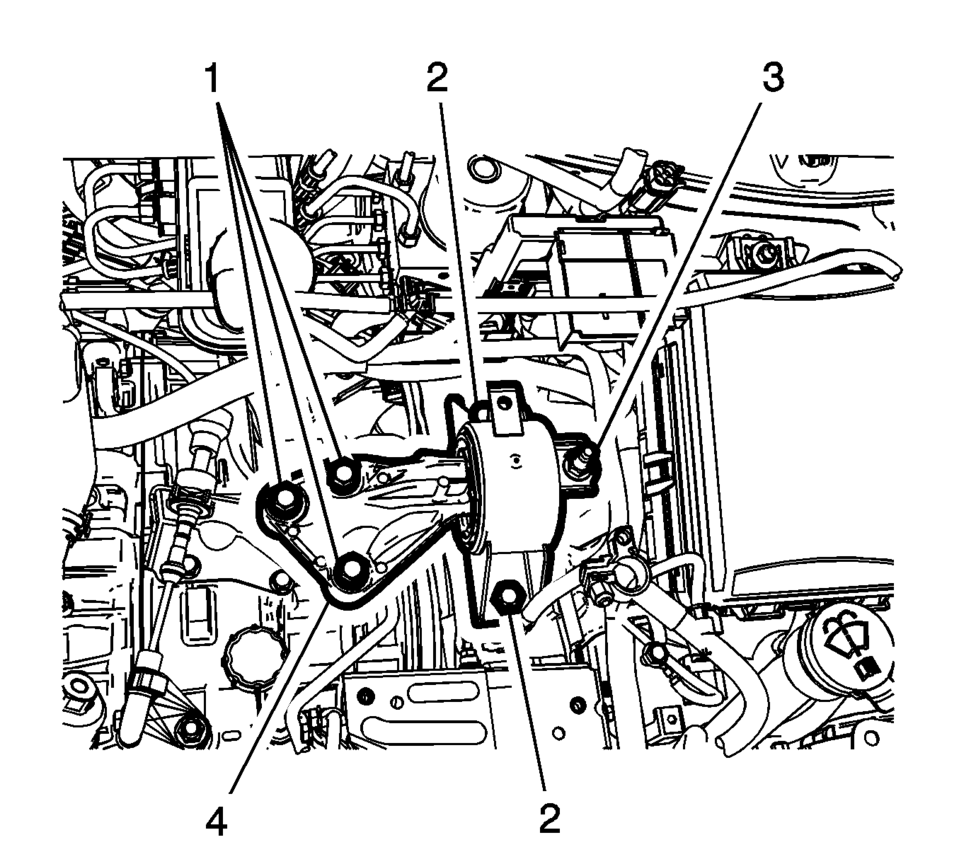
- Remove and DISCARD the left transmission mount to bracket bolts (1).
- Remove the left transmission mount to body bolts (2).
- Remove the left transmission mount to body nut (3).
- Remove the transmission mount (4) from the vehicle.
- Installation Procedure
-
- Install the left transmission mount (4) to the vehicle.
- Install the transmission mount to body bolts (2) and
tighten to 58 Y (43 lb ft)
.
- Install the transmission mount to body nut (3) and
tighten to 58 Y (43 lb ft)
.
- Install the NEW left transmission mount to transmission
bolts (1) and tighten to 50 Y (37 lb ft)
plus 60?5 degrees
.
- Remove the engine support fixture. Refer to Engine Support Fixture.
- Install the battery tray. Refer to Battery Tray Replacement.
Caution:
Refer to Fastener Caution.
 Transmission Mount Bracket Replacement - Rear
Removal Procedure
Raise and support the vehicle. Refer to
Lifting and Jacking the Vehicle.
Using a suitable jack stand, support the rear of the
transmission.
Remove ...
 Front Wheel Drive Shaft Seal Replacement - Right Side
Front Wheel Drive Shaft Seal Replacement - Right Side
Callout
Component Name
Preliminary Procedures
Raise and support the vehicle. ...
Other materials:
Door Lock and Ignition Lock Folding Key Blade Removal and Installation
Special Tools
BO-51098 Flip Key Blade Fixture
For equivalent region tools, refer to Special Tools.
Caution: Failure to properly support the Remote Keyless Entry
(RKE) transmitter assembly while replacing the key blade may cause internal
damage to the transmitter assembly. ...
Rear Side Door Outer Panel Replacement
Removal Procedure
Warning: Refer to Glass and Sheet Metal Handling Warning.
Note: According to different corrosion warranties, only the
regional mandatory joining methods are allowed.
Disable the SIR System. Refer to SIR Disabling and Enabling.
Dis ...
Piston and Connecting Rod Disassemble
Remove the piston with connection rod. Refer to Piston, Connecting Rod,
and Bearing Removal.
Note: Note installation position of the piston in respect of the
connection rod.
Detach the piston from the connection rod.
Note: Do not damage the bore.
Remove ...

0.0083