
Chevrolet Sonic Owner's Manual: Trunk Release
To lock or unlock the trunk from the inside, press
 or
or
 on the central locking switch or on
the driver door switch.

To open the trunk from inside the vehicle press
 .
.
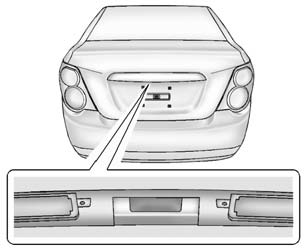
To lock the trunk from the outside press
on the RKE transmitter.
To open the trunk from outside of the vehicle:
- Press on the RKE transmitter
to unlock all doors, then use the touch pad. - Press
 or
or
on the RKE transmitter.
See Trunk (Sedan) and Remote Keyless Entry (RKE) System Operation.
 Liftgate
To lock or unlock the liftgate from the inside, press
or
on the central locking switch or on
the driver door switch.
The vehicle must be in P (Park) for automatic transmissions. For manual tran ...
 Windows
Manual Windows
If equipped, use the window crank to open and close each window.
See Manual Windows.
Power Windows
If equipped, press the switch down to open the window. Pull the front of the
s ...
Other materials:
Windshield Upper Reveal Molding Replacement
Windshield Upper Reveal Molding Replacement
Callout
Component Name
Preliminary Procedures
Remove the windshield to replace the reveal molding. Refer to Windshield
Replacement.
1
Windshield Revea ...
Aluminum Wheel Refinishing
Finish Damage Evaluation Procedure
Note:
If the wheels are chrome-plated, do not re-plate or refinish
the wheels.
If the wheels are polished aluminum, do not refinish the wheels
in the dealer environment. Utilize a refinisher that meets manufacturer
...
Drive Range, Sixth Gear (Gen 2)
As vehicle speed increases, the transmission control module (TCM) processes input
signals from the automatic transmission input and output speed sensors, the throttle
position sensor and other vehicle sensors to determine the precise moment to command
ON the normally-low 26 pressure control so ...

0.0102