
Chevrolet Sonic Owner's Manual: Windshield Wiper/Washer
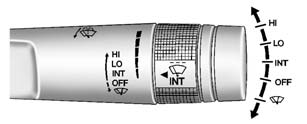
Sedan
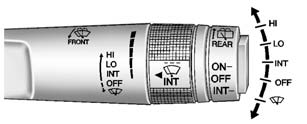
Hatchback
The windshield wiper/washer lever is on the right side of the steering column.
Move the lever to one of the following positions:
HI: Use for fast wipes.
LO: Use for slow wipes.
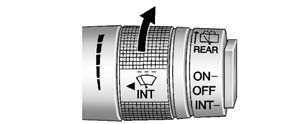
Hatchback Shown, Sedan Similar
INT: (Intermittent Wipes): Move the lever up to INT for intermittent wipes, then
turn the  INT band up for more frequent
wipes or down for less frequent wipes.
OFF: Use to turn the wipers off.
 (Mist): For a single wipe, briefly
move the wiper lever down. For several wipes, hold the wiper lever down.
Wiper Parking
If the ignition is put in OFF while the wipers are on LO, HI, or INT, they will immediately stop.
If the windshield wiper lever is then moved to OFF before the driver door is opened or within 10 minutes, the wipers will restart and move to the base of the windshield.
If the ignition is put in OFF while the wipers are performing wipes due to windshield washing, the wipers continue to run until they reach the base of the windshield.
 (Windshield Washer): Pull the windshield
wiper lever toward you to spray windshield washer fluid and activate the wipers.
The wipers will continue until the lever is released or the maximum wash time is
reached. When the windshield wiper lever is released, additional wipes may occur
depending on how long the windshield washer had been activated. See Washer Fluid for information on filling the windshield washer fluid reservoir.
Warning
In freezing weather, do not use the washer until the windshield is warmed. Otherwise the washer fluid can form ice on the windshield, blocking your vision.
Clear snow and ice from the wiper blades before using them. If frozen to the windshield, carefully loosen or thaw them. Damaged wiper blades should be replaced. See Wiper Blade Replacement.
Heavy snow or ice can overload the wiper motor. A circuit breaker will stop the motor until it cools down.
 Horn
Horn
Press on the steering wheel pad
to sound the horn. ...
 Rear Window Wiper/ Washer
If equipped with the rear wiper/ washer, the controls are on the end of the windshield
wiper lever.
ON: Press the upper portion of the button for continuous rear window wipes.
OFF: The rear wipe ...
Other materials:
Cylinder Head Disassemble
Special Tools
EN-840 Pliers/Remover
EN-8062 Valve Spring Compressor
EN-8062-5 Adapter
EN-50717-2 Compressor Assembly of EN-50717 Kit
For equivalent regional tools, refer to Special Tools.
Install the EN-50717?E assembly (1) to the EN-8062 compressor
(4).
Install the E ...
Camshaft Intake and Exhaust Sprocket Replacement
Special Tools
EN-955-A Locking Pin
For equivalent regional tools, refer to Special Tools.
Removal Procedure
Remove the air cleaner assembly. Refer to Air Cleaner Assembly Replacement.
Remove the camshaft cover. Refer to Camshaft Cover Replacement.
Remove both camshaft p ...
Drive Range, Sixth Gear (Gen 2)
As vehicle speed increases, the transmission control module (TCM) processes input
signals from the automatic transmission input and output speed sensors, the throttle
position sensor and other vehicle sensors to determine the precise moment to command
ON the normally-low 26 pressure control so ...

0.0057