
Chevrolet Sonic Repair Manual: Wireless Communication Interface Antenna Replacement
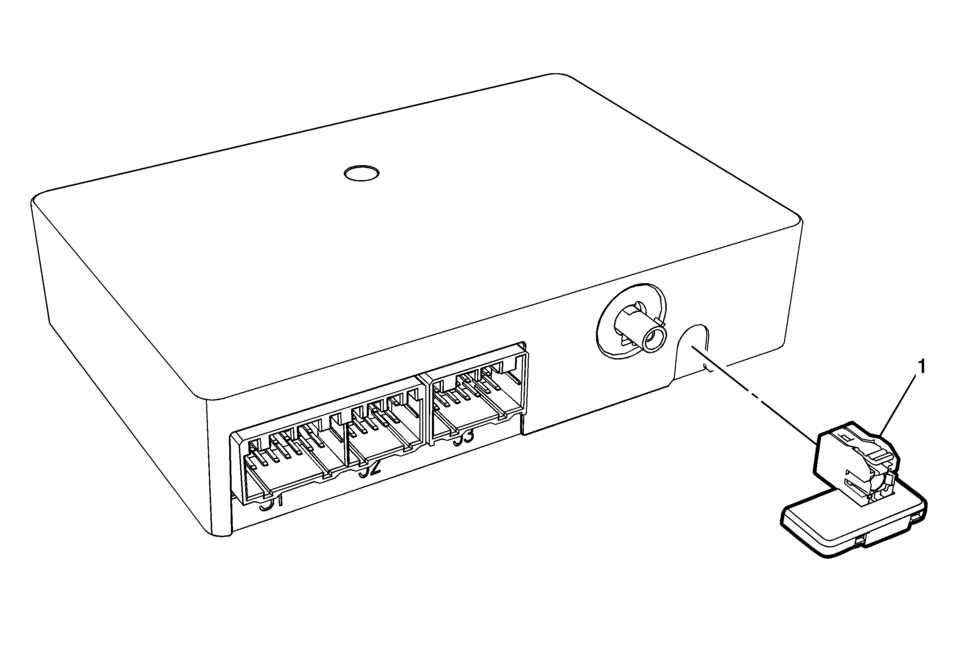
|
Callout |
Component Name |
|---|---|
|
Preliminary Procedure
Remove the communication interface module. Refer to Communication Interface Module Replacement |
|
|
1 |
Wireless Communication Interface Antenna Bluetooth Module Procedure
Unsnap the Antenna from Communication Module. |
 Special Tools (MIT Tool Instructions)
Bluetooth Pairing for Vehicles with
Radio RPO: UF7
Either reset the pin code on the radio to 0000, or go under Device Info on
the radio and see what the pin code is (to enter it later o ...
 Audio
Audio
...
Other materials:
Front Seat Belt Buckle Replacement
Front Seat Belt Buckle Replacement
Callout
Component Name
Preliminary Procedures
Remove the front seat. Refer to Driver or Passenger Seat Removal and
Installation.
1
Driver or Passenger Seat Bel ...
Transmission Adaptive Functions
The 6T30/40/45/50 transmission utilizes a line pressure control system during
upshifts to compensate for the normal wear of transmission components. As the apply
components within the transmission wear or change over time, shift time (the time
required to apply a clutch) increase or decreases. ...
Locking with power door lock switch
Driver's armrest
Front passenger's armrest
Basic information
The Nissan Armada power door lock system allows centralized locking and unlocking
of all doors using switches located on both the driver’s and front passenger’s doors.
To lock all doors, press the switch to the lo ...

0.007