
Chevrolet Sonic Repair Manual: Wireless Communication Interface Antenna Replacement
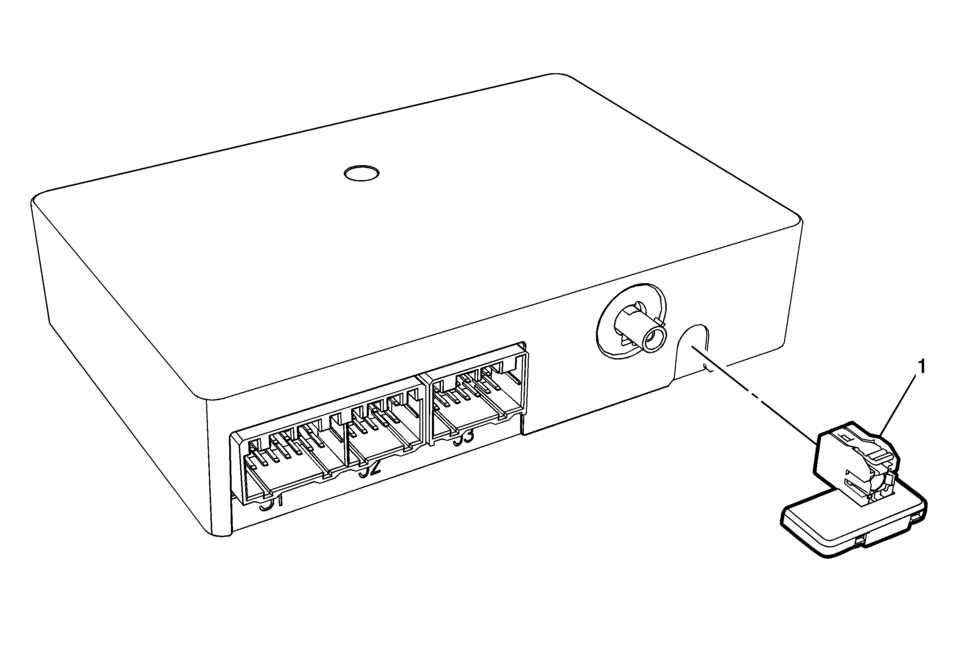
|
Callout |
Component Name |
|---|---|
|
Preliminary Procedure
Remove the communication interface module. Refer to Communication Interface Module Replacement |
|
|
1 |
Wireless Communication Interface Antenna Bluetooth Module Procedure
Unsnap the Antenna from Communication Module. |
 Special Tools (MIT Tool Instructions)
Bluetooth Pairing for Vehicles with
Radio RPO: UF7
Either reset the pin code on the radio to 0000, or go under Device Info on
the radio and see what the pin code is (to enter it later o ...

Other materials:
SIR Service Precautions
General Service Instructions
Warning: When performing service on or near the SIR components
or the SIR wiring, the SIR system must be disabled. Refer to SIR Disabling
and Enabling . Failure to observe the correct procedure could cause deployment
of the SIR components, person ...
Turbocharger Coolant Feed Pipe Replacement (LUV)
Turbocharger Coolant Feed Pipe Replacement
Callout
Component Name
Preliminary Procedure
Remove the turbocharger. Refer to Turbocharger Replacement.
1
Turbocharger Fastener
Caution: Refer to ...
Range Selector Lever Cable Replacement
Removal Procedure
Set the park brake and chock the wheels.
Disconnect the transmission range selector lever cable
terminal (1) from the transmission manual shift lever pin.
Press the locking tabs inward in order to release
the transmission range selector lev ...

0.0057