
Chevrolet Sonic Repair Manual: Airbag Side Impact Sensor Replacement (with AYF/AYO)
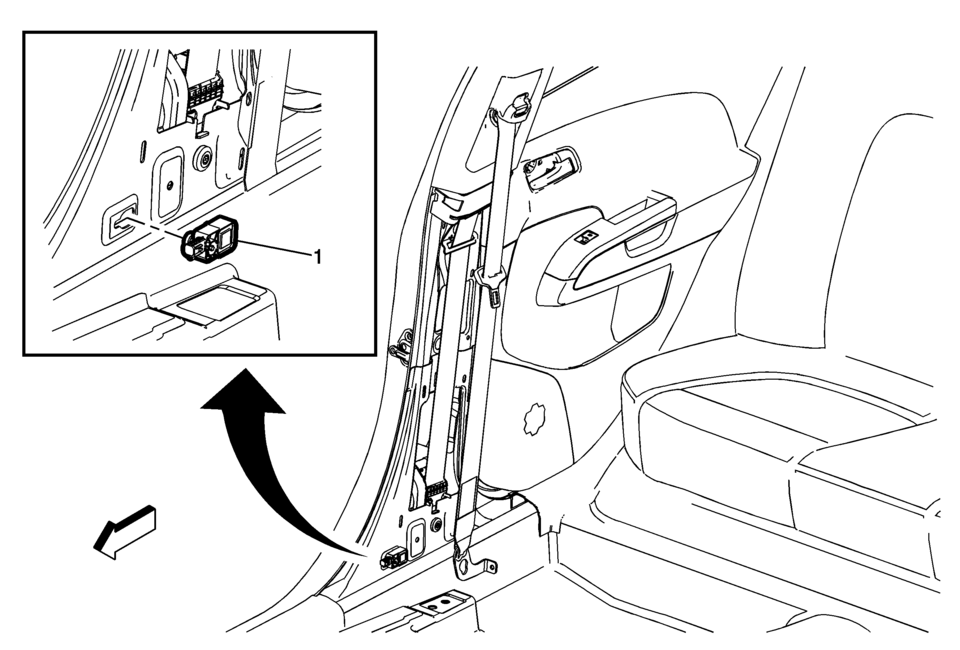
|
Callout |
Component Name |
|---|---|
|
Warning: Refer to SIR Warning. Warning: Refer to SIR Inflator Module Handling and Storage Warning. Warning: Following the deployment of a side impact air bag, inspect the following parts for damage. Replace these parts if necessary:
Failure to do so may cause future personal injury.
|
|
|
1 |
Inflatable Restraint Side Impact Sensor Assembly Caution: Refer to Fastener Caution.
7.5?€‰Y (66?€‰lb?€‰in) |
 Supplemental Inflatable Restraint System Description and Operation
SIR System Overview
The supplemental inflatable restraint (SIR) system supplements the protection
offered by the seat belts. The SIR system contains an inflatable restraint sensing
and ...
 Inflatable Restraint Remote Impact Sensor Replacement
Inflatable Restraint Remote Impact Sensor Replacement
Callout
Component Name
Warning: When performing service on or near the S ...
Other materials:
Engine Flywheel Installation
Special Tools
EN-652 Flywheel Holder
EN-45059 Torque Angle Sensor Kit
For equivalent regional tools, refer to Special Tools.
Clean the thread in the crankshaft.
Install the crankshaft position reluctor ring (1).
Install the flywheel (2).
Install the EN-652 ...
Engine Oil Cooler Outlet Hose Replacement (LUV)
Engine Oil Cooler Outlet Hose Replacement
Callout
Component Name
Preliminary Procedure
Drain the cooling system. Refer to Cooling System Draining and Filling.
Disconnect the radiator outlet hose. Refer to Radiator Outlet H ...
Assist grips
The Nissan Armada assist grips are strategically positioned above the front passenger
door and rear side doors to provide additional support for passengers during travel.
CAUTION
Do not use the Nissan Armada assist grips as a support when entering or exiting
the vehicle. Improper use may d ...

0.0065