
Chevrolet Sonic Repair Manual: Backup Lamp Switch Replacement
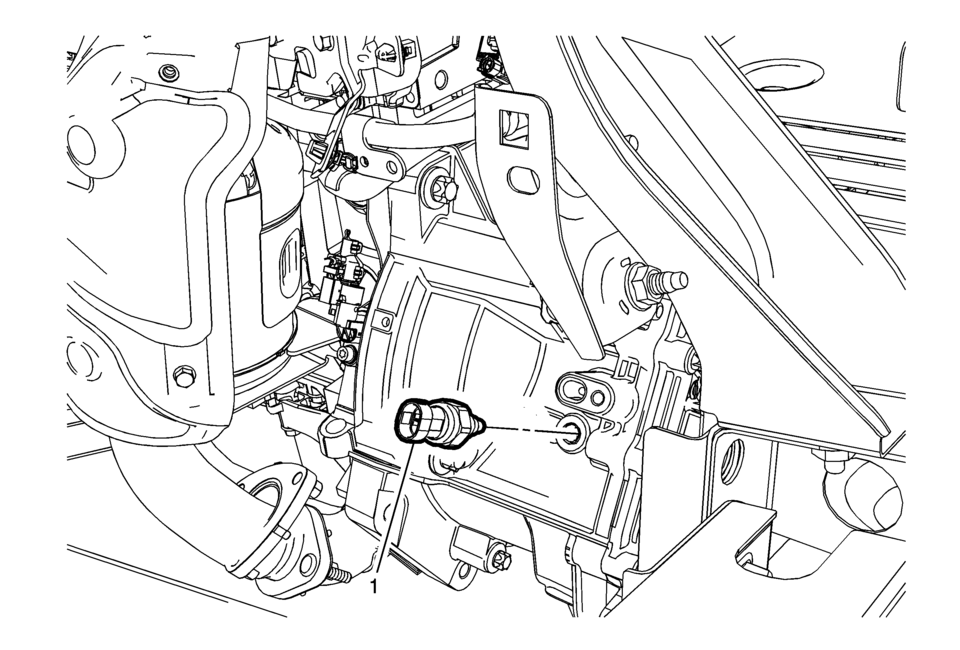
|
Callout |
Component Name |
|---|---|
Preliminary Procedure
|
|
|
1 |
Backup Lamp Switch Caution: Refer to Component Fastener Tightening Caution. Procedure
Disconnect the electrical connector. Tighten
20?€‰Y (15?€‰lb?€‰ft) |
|
2 |
Backup Lamp Switch Washer Procedure
DISCARD the washer and install a NEW washer. |
 Backup Lamp Bulb Replacement (Sedan)
Backup Lamp Bulb Replacement
Callout
Component Name
Preliminary Procedure
Remove the tail lamp assembly. Refer to Tail Lamp Rep ...
 Backup Lamp Switch Replacement
Removal Procedure
Disconnect the electrical connector from the backup lamp switch?€‰(1).
Remove the backup lamp switch?€‰(1) from the transmission.
Remove and D ...
Other materials:
Front Bumper Fascia Replacement
Front Bumper Fascia Replacement
Callout
Component Name
Preliminary Procedures
Remove the radiator opening upper cover. Refer to Front Opening
Upper Cover Replacement.
Remove the front bumper opening lower cover. Refer to ...
Special Tools
Illustration
Tool Number/ Description
CH-161-B
DT-161-B
KM-161-B
J-22888-20A
Bearing Puller
CH-804
CH-49692
MKM-804
Tensioner
CH-39570
J-39570
...
Drive Belt Tensioner Installation
Install the drive belt tensioner (1).
Install the upper drive belt tensioner bolt (2).
Install the lower drive belt tensioner bolt (3).
Caution: Refer to Fastener Caution.
Tighten the lower drive belt tensioner bolt (M8) to 22 Y (16&# ...

0.0064