
Chevrolet Sonic Repair Manual: Drive Belt Removal
Special Tools
- EN-955 Locking Pins
- EN-48488 Holding Wrench
For equivalent regional tools, refer to Special Tools.
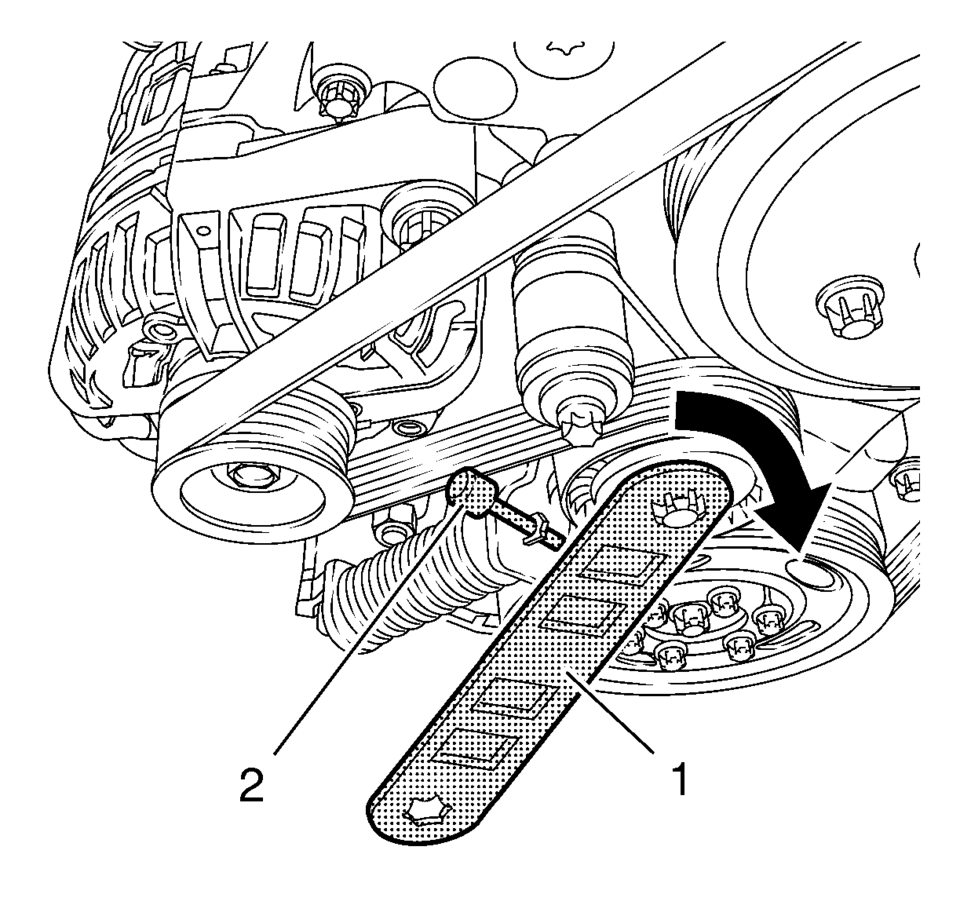
- Install EN-48488 wrench (1) to the drive belt tensioner.
- Move the drive belt tensioner clockwise until the drive belt tensioner can be fixed with the EN-955?E0 locking pin (2).
- Remove the drive belt.
Note:
The drive belt tensioner must always be in a pre-tensioned state.
 Drive Belt Installation
Special Tools
EN-955 Locking Pins
EN-48488 Holding Wrench
For equivalent regional tools, refer to Special Tools.
Note: Ensure that the drive belt tensioner is held with EN-955?E
...
 Drive Belt Replacement
Special Tools
EN-48488 Holding Wrench
EN-955 Locking Pin
For equivalent regional tools, refer to Special Tools.
Removal Procedure
Remove the right front wheelhouse liner extens ...
Other materials:
Rear Side Door Window Outer Sealing Strip Replacement (Sedan)
Rear Side Door Window Outer Sealing Strip Replacement
Callout
Component Name
1
Rear Side Door Window Outer Sealing Strip
Procedure
Use the appropriate tool, lift one end up and pull away from the door
flange t ...
Hood Replacement
Hood Replacement
Callout
Component Name
Preliminary Procedure
Disconnect the windshield washer nozzle hose.
1
Hood Hinge Nut (Qty:?€‰4)
Caution: Refer to Fastener Caution.
Procedu ...
Vehicle Speed Sensor Replacement
Vehicle Speed Sensor Replacement
Callout
Component Name
1
Engine Wiring Harness Bracket Nut
Caution: Refer to Fastener Caution.
Tighten
9 Y (80 lb in)
2
...

0.0055