
Chevrolet Sonic Repair Manual: Engine Front Cover and Oil Pump Removal
- Set engine to TDC. Refer to Camshaft Timing Chain Inspection.
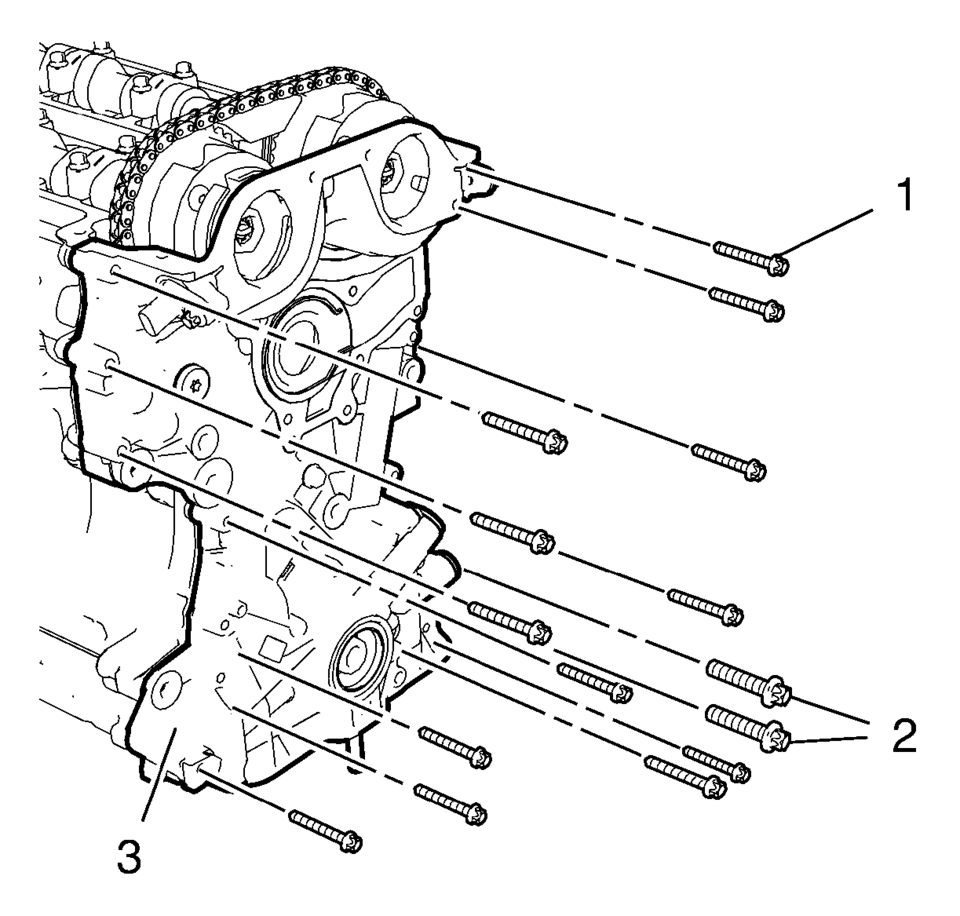
- Remove the 13 engine front cover bolts M6 (1).
- Remove the 2 engine front cover bolts M10 (2).
- Remove the engine front cover.
 Engine Front Cover and Oil Pump Installation
Special Tools
EN-952 Fixing Pin
EN-953-A Fixing Tool
EN-49977-100 Transmitter Disc Fixation
EN-49977-200 Fixing Tool
For equivalent regional tools, refer to Special Tools.
...
 Engine Front Cover with Oil Pump Replacement
Removal Procedure
Disconnect the battery negative cable. Refer to Battery Negative Cable
Disconnection and Connection.
Set the engine to TDC. Refer to Camshaft Timing Chain Inspec ...
Other materials:
How to Reset the Engine Oil Life System
Reset the system whenever the engine oil is changed so that the system can calculate
the next engine oil change. To reset the system:
1. Press the MENU button to show Remaining Oil Life on the display. This display
shows an estimate of the oil’s remaining useful life. If 99% is displayed, tha ...
Adhesive Installation of Liftgate Windows
Warning: Refer to Glass and Sheet Metal Handling Warning.
Use a urethane adhesive systems which meet GM Specification GM?€‰3651G.
Remove all mounds or loose pieces of urethane adhesive from the pinchweld
area.
If the original window is being reused, remove all but approxi ...
How to use the HUD
Basic information
To activate the Head Up Display in the Nissan Armada, press the HUD switch. Press
it again to turn the system off.
If the HUD is turned off, it will remain disabled even after restarting the Nissan
Armada, maintaining the last selected setting.
The following HUD settings ...

0.0071