
Chevrolet Sonic Repair Manual: Generator Pulley Replacement (LUV)
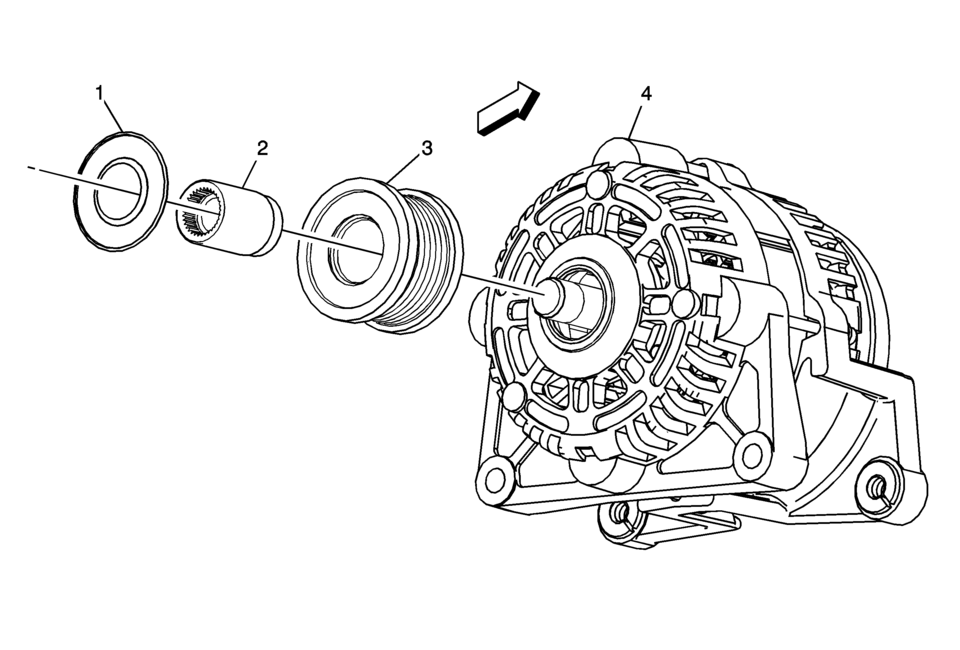
|
Callout |
Component Name |
|---|---|
|
Preliminary Procedure
Remove the generator. Refer to Generator Replacement. |
|
|
1 |
Generator Pulley Nut Cap |
|
2 |
Generator Pulley Nut Caution: Refer to Fastener Caution. Procedure
Remove the generator pulley nut by using EN-6372 counterhold . Tighten
90 Y (66 lb ft) Special Tools
EN-6372 Counterhold For equivalent regional tools, refer to Special Tools. |
|
3 |
Generator Pulley |
|
4 |
Generator |
 Power Steering Pump Belt Removal
Caution: Do not use belt dressing on the drive belt. Belt dressing
causes the breakdown of the composition of the drive belt. Failure to follow
this recommendation will damage the ...
 Starting System
...
Other materials:
Bluetooth Audio
Streaming Audio
If equipped, music may be played from a paired Bluetooth. See Bluetooth (Voice
Recognition) or Bluetooth (Overview) or Bluetooth (Infotainment
Controls) for help pairing a device.
The music can be controlled by controls on the device.
To play music via Blueto ...
Antilock Brake System (ABS)
This vehicle has ABS, an advanced electronic braking system that helps prevent
a braking skid.
When the vehicle begins to drive away, ABS checks itself.
A momentary motor or clicking noise might be heard while this test is going on,
and it might even be noticed that the brake pedal moves a lit ...
Data Link Communications Description and Operation
Note: This is an overview of different serial data buses used by GM
devices to communicate with each others. Use Data Communication Schematics to
find out which serial data buses are configured for a specific vehicle.
Circuit Description
There are many components in a vehicle t ...

0.007