
Chevrolet Sonic Repair Manual: Drivetrain and Front Suspension Frame Skid Plate Replacement
- Removal Procedure
-
- Raise and support the vehicle. Refer to Lifting and Jacking the Vehicle.
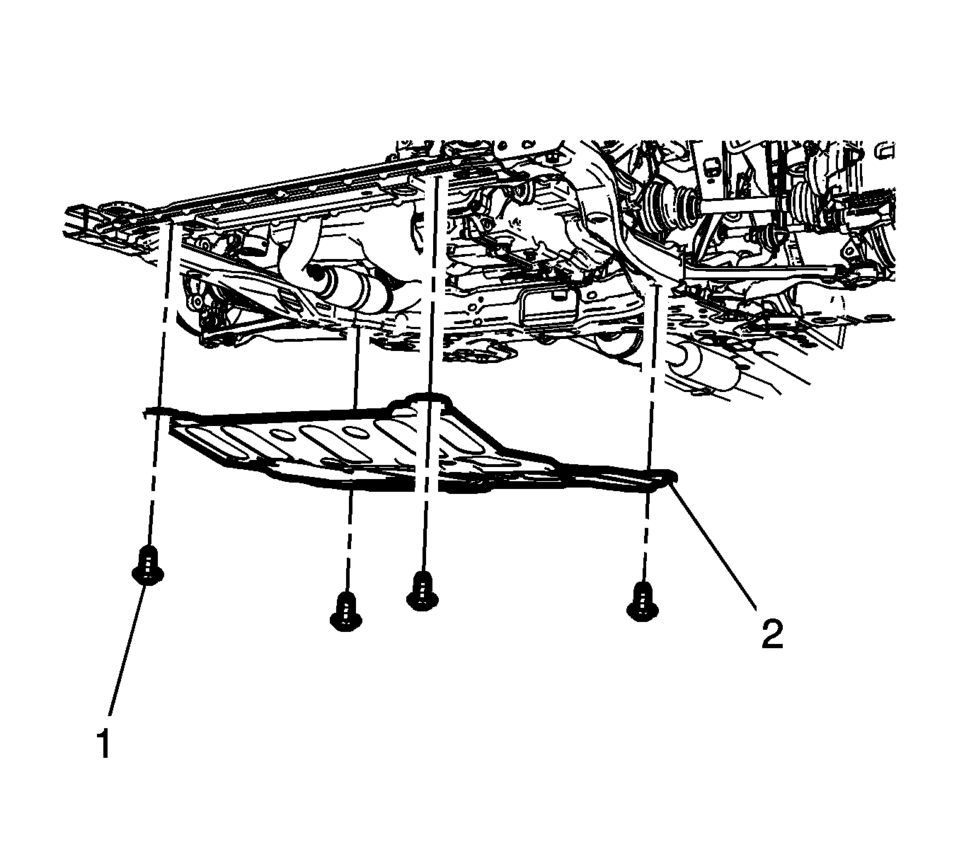
- Remove the mounting bolts?€‰(1) for the front suspension frame skid plate.
- Remove the front suspension frame skid plate?€‰(2).
- Installation Procedure
-
- Position the front suspension frame skid plate?€‰(2) on the frame.
- Install the front suspension frame skid plate mounting bolts?€‰(2) and
tighten to 22?€‰Y (16?€‰lb?€‰ft)
.
Caution:
Refer to Fastener Caution.
 Drivetrain and Front Suspension Frame Replacement
Special Tools
EN-45059 Angle Meter
For equivalent regional tools, refer to Special Tools.
Removal Procedure
Support the radiator and condenser from above using the upper brackets
...
 Front Compartment Front Insulator Cover Replacement
Front Compartment Front Insulator Cover Replacement
Callout
Component Name
1
Front Compartment Front Insulator Cover Scr ...
Other materials:
Wheel Replacement
Replace any wheel that is bent, cracked, or badly rusted or corroded. If wheel
nuts keep coming loose, the wheel, wheel bolts, and wheel nuts should be replaced.
If the wheel leaks air, replace it. Some aluminum wheels can be repaired. See your
dealer if any of these conditions exist.
Your de ...
Roof Panel Joint Finish Molding Replacement
Roof Panel Joint Finish Molding Replacement
Callout
Component Name
Caution: Refer to Exterior Trim Emblem Removal Caution.
Preliminary Procedures
Begin at the rear edge of the roof panel joint finish molding an ...
SIR Inflator Module Handling and Storage Warning
Warning: When carrying an undeployed inflator module:
Do not carry the inflator module by the wires or connector.
Make sure the air bag opening points away from you.
When storing an undeployed inflator module:
Make sure the air bag opening points away from the surface o ...

0.0065