
Chevrolet Sonic Owner's Manual: Instrument Panel Storage
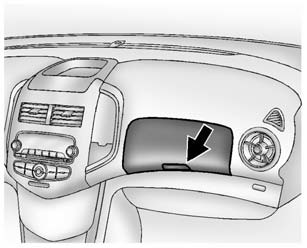
Lift up on the lever to open.
If equipped, the storage area has an auxiliary input jack and USB port inside.
 Storage Compartments
Warning
Do not store heavy or sharp objects in storage compartments. In a crash, these
objects may cause the cover to open and could result in injury. ...
 Glove Box
Lift up on the glove box lever to open it. ...
Other materials:
Clearcoat Repair without Repainting
Repair Procedure
Thoroughly wash the repair area with Liquid Wash and Wax GM?€‰P/N?€‰1052870
or the equivalent.
Environmental damage may be corrected. Refer to Environmental Fallout
(Acid Rain) or Rail Dust Damage Repair.
Important: Follow all of the instruc ...
Turbocharger System Description
12
(1)
Turbocharger Bypass Solenoid Valve
(2)
Multifunction Intake Air Sensor
(3)
Turbocharger Wastegate Regulator Solenoid Valve
(4)
Turbocharger
(5)
Turbocharger Bypass Valve
(6)
Turbocharger Was ...
Transmission Case Disassemble (Gen 2)
Special Tools
3-9506289 Universal Adapter
J-810700 Mainshaft Bearing Remover
J-810704 Center Bar Puller
M-680770 Universal Sliding Mallet
R-0007758 Holding Fixture
R-0007770 Holding Fixture Adapter Plates
T-0307000 Extractor and Driver Fixture
T-9807671 Slide Hammer
For eq ...

0.006