
Chevrolet Sonic Owner's Manual: Interior Lighting
Dome Lamps
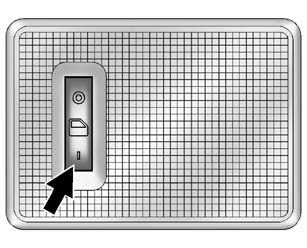
The dome lamp controls are in the headliner above the rear seats.
 : Press to turn the lamps off, even
when a door is open.
 : When the button is returned to
the middle position, the lamps turn on automatically when a door is opened.
 : Press to turn on the dome lamps.
Reading Lamps
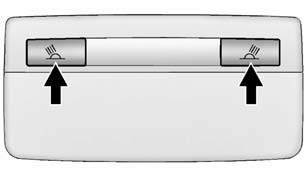
For vehicles with front reading lamps, they are in the overhead console.
 or
or
 : Press to turn each lamp on or off.
For more information about interior lighting, see Instrument Panel Illumination Control or Courtesy Lamps.
 Steering Wheel Adjustment
To adjust the steering wheel:
1. Pull the lever down.
2. Move the steering wheel up, down, forward, and backward.
3. Pull the lever up to lock the steering wheel in place.
Do not adjust the stee ...
 Exterior Lighting
The exterior lamp control is on the instrument panel to the outboard side of
the steering column.
O : Briefly turn to this position to turn the automatic light control off or
on again.
AUTO: T ...
Other materials:
Heater and Air Conditioning Evaporator and Blower Module Removal and Installation
Heater and Air Conditioning Evaporator and Blower Module Removal and
Installation
Callout
Component Name
Preliminary Procedures
Recover the refrigerant. Refer to Refrigerant Recovery and Recharging.
Drain the cooling sy ...
2-6 Clutch Piston Installation (6T30)
2-6 Clutch Piston Installation
Callout
Component Name
1
2? Clutch Piston Assembly
Note:
Position the 2? piston air bleed and large slot toward the
top of the case.
DT-48271 seal protector pr ...
Transmission Case Disassemble (Gen 1)
Special Tools
3-9506289 Universal Adapter
J-810700 Mainshaft Bearing Remover
J-810704 Center Bar Puller
M-680770 Universal Sliding Mallet
R-0007758 Holding Fixture
R-0007770 Holding Fixture Adapter Plates
T-0307000 Extractor and Driver Fixture
T-9807671 Slide Hammer
For eq ...

0.0047