
Chevrolet Sonic Repair Manual: Mobile Telephone Microphone Replacement
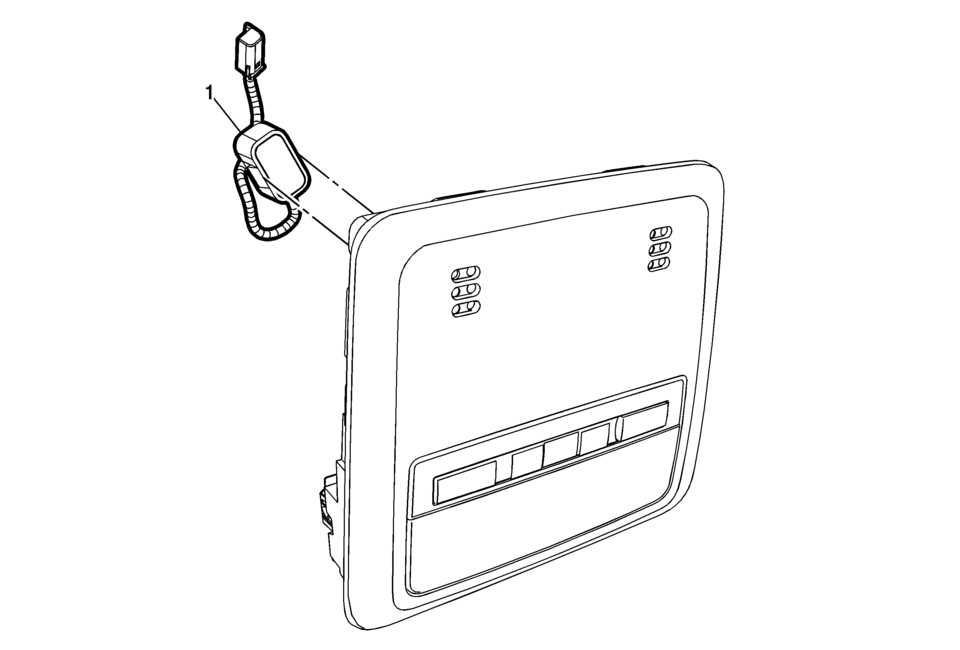
|
Callout |
Component Name |
|---|---|
|
Preliminary Procedure
Remove the dome lamp bezel. Refer to Dome Lamp Bezel Replacement. |
|
|
1 |
Mobile Telephone Microphone Procedure
Disconnect the electrical connector. |
 Communication Interface Module Replacement
Communication Interface Module Replacement
Callout
Component Name
Preliminary Procedure
Remove the instrument panel lower compartme ...
 OnStar Description and Operation
This OnStar® system consists of the following components:
Telematics communication interface control module
OnStar® three button assembly
Microphone
Cellular antenna
Navigation antenna
...
Other materials:
Shoulder Belt Height Adjuster
The vehicle has a shoulder belt height adjuster for the driver and right front
passenger seating positions.
Adjust the height so the shoulder portion of the belt is on the shoulder and
not falling off of it. The belt should be close to, but not contacting, the neck.
Improper shoulder belt hei ...
Hub/Axle Flange and Wheel Stud Runout Inspection
Special Tools
GE-8001 Dial Indicator Set , or equivalent
Raise and support the vehicle. Refer to Lifting and Jacking the Vehicle.
Mark the location of the wheels to the wheel studs and mark the specific
vehicle position on each tire and wheel – LF, LR, RF, RR.
Remove the tire and ...
Intake Manifold Disassemble (1.8L LUW and LWE)
Remove the intake manifold absolute pressure sensor bolt (1).
Remove the manifold absolute pressure sensor (2) from the intake manifold (3).
Remove the intake manifold mount (2) from the intake manifold (1).
Remove the throttle body seal& ...

0.0229