
Chevrolet Sonic Repair Manual: Radio Antenna Base Replacement
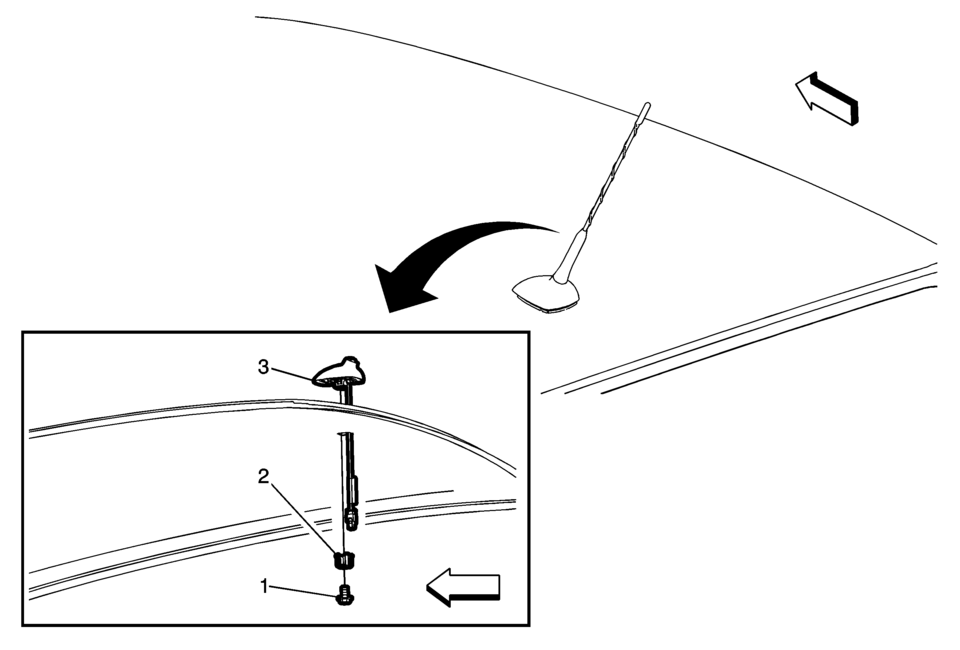
|
Callout |
Component Name |
|---|---|
|
Preliminary Procedure
Lower the rear of the headlining trim panel. Refer to Headlining Trim Panel Replacement. |
|
|
1 |
Radio Antenna Base Fastener Caution: Refer to Fastener Caution.
9 Y (80 lb in) |
|
2 |
Radio Antenna Base Retainer |
|
3 |
Radio Antenna Base Assembly Procedure
Disconnect the electrical connectors. |
 Overview (Radio with Touchscreen)
z VOL
y (Volume)
Press to decrease or increase the volume.
O (Power)
Press and hold to turn the power on or off.
D (Home Page)
Press to go to the Home Page. See Hom ...
 Radio Antenna Replacement
Radio Antenna Replacement
Callout
Component Name
1
Radio Antenna
Procedure
Rotate the mast counterclockwise in or ...
Other materials:
Securing an Add-On Child Restraint in the Vehicle
Warning
A child can be seriously injured or killed in a crash if the child restraint
is not properly secured in the vehicle. Secure the child restraint properly in the
vehicle using the vehicle safety belt or LATCH system, following the instructions
that came with that child restraint and the ...
Brake Assist
This vehicle has a brake assist feature designed to assist the driver in stopping
or decreasing vehicle speed in emergency driving conditions. This feature automatically
uses the stability system hydraulic brake control module to supplement the power
brake system under conditions where the dri ...
Front Disc Brake Pads Replacement
Removal Procedure
Warning: Refer to Brake Dust Warning.
Note: Always replace disc brake pads in axle sets.
Inspect the fluid level in the brake master cylinder reservoir.
If the brake fluid level is midway between the maximum-full point and
the minimum allowab ...

0.0052