
Chevrolet Sonic Repair Manual: Rear Seat Back Bolster Replacement
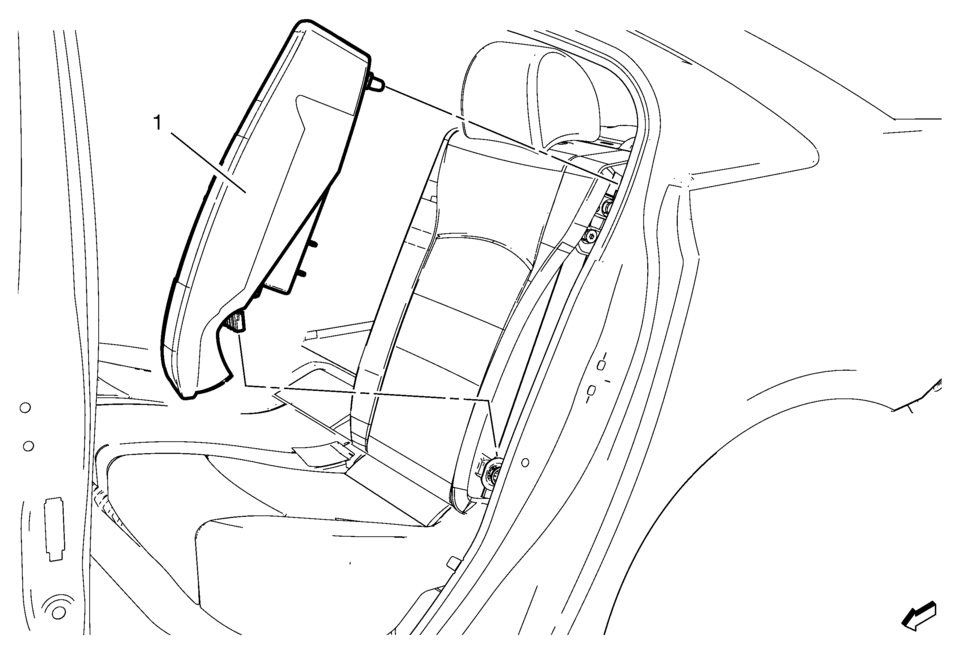
|
Callout |
Component Name |
|---|---|
|
Preliminary Procedures
Disable the SIR system. Refer to SIR Disabling and Enabling |
|
|
1 |
Rear Seat Back Cushion Bolster Warning: Refer to SIR Warning Warning: Do not repair or replace the seat stitching or seams in the seat back trim cover with an internal mounted seat side airbag module. Replace the complete seat back trim cover from the OEM. Non-OEM seat stitching may cause improper airbag deployment which could result in personal injury.
|
 Body Rear Seat Back Trim Panel Replacement (with AMA/AM7)
Body Rear Seat Back Trim Panel Replacement
Callout
Component Name
Preliminary Procedure
Remove the body side trim panel. Refer ...
 Rear Seat Back Cushion Cover and Pad Replacement (AMA 60% w/Split Back)
Rear Seat Back Cushion Cover and Pad Replacement
Callout
Component Name
Preliminary Procedure
Remove the rear seat back cushion. Re ...
Other materials:
Tire Pressure Indicator Sensor Replacement
Removal Procedure
Raise the vehicle on a suitable support. Refer to Lifting and Jacking
the Vehicle.
Remove the tire/wheel assembly from the vehicle. Refer to Tire and Wheel
Removal and Installation.
Dismount the tire from the rim. Refer to Tire Dismounting and Mounting. ...
Exhaust Manifold Heat Shield Replacement (LUV)
Exhaust Manifold Heat Shield Replacement
Callout
Component Name
Warning: Refer to Exhaust Service Warning.
1
Exhaust Manifold Heat Shield Fasteners (Qty: 3)
Caution: Refer to Fas ...
Warning/indicator lights (yellow)
Anti-lock Braking System (ABS) warning light
or
In the Nissan Armada, the Anti-lock Braking System (ABS) warning light is an
essential diagnostic indicator that confirms the proper operation of the braking
assistance system. When the ignition switch is turned to the ON position, this li ...

0.0053