
Chevrolet Sonic Owner's Manual: Rear Wiper Blade Replacement
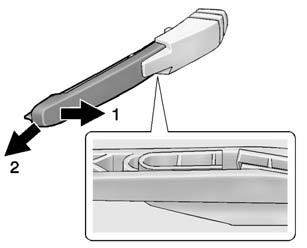
1. Pull the wiper arm a short distance away from the glass (1).
2. Pull the blade out from the arm (2).
It may require extra effort to remove the old blade.
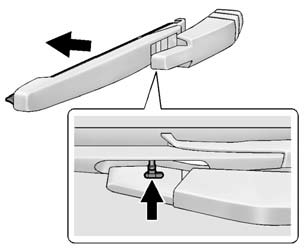
3. Once the blade pin disengages from the wiper arm, remove the wiper blade by sliding the pin out of the guide hole.
4. Reverse the steps to install the new blade.
 Front Wiper Blade Replacement
Windshield wiper blades should be inspected for wear or cracking. See the Maintenance
Schedule for more information.
Replacement blades come in different types and are removed in different wa ...
 Headlamp Aiming
Headlamp aim has been preset and should need no further adjustment.
If the vehicle is damaged in a crash, the headlamp aim may be affected. If adjustment
to the headlamps is necessary, see your dea ...
Other materials:
Brake Pedal Position Sensor Calibration
Calibration Criteria
Note: Do not apply the brake pedal during the brake pedal position
sensor calibration procedure. Any movement of the brake pedal during this
procedure will cause the calibration procedure to fail. If this occurs,
the brake pedal position sensor calibrati ...
Master Cylinder Bench Bleeding
Warning: Refer to Brake Fluid Irritant Warning.
Caution: Refer to Brake Fluid Effects on Paint and Electrical
Components Caution.
Secure the mounting flange of the brake master cylinder in a bench vice
so that the rear of the primary piston is accessible.
Remov ...
Aluminum Wheel Refinishing
Finish Damage Evaluation Procedure
Note:
If the wheels are chrome-plated, do not re-plate or refinish
the wheels.
If the wheels are polished aluminum, do not refinish the wheels
in the dealer environment. Utilize a refinisher that meets manufacturer
...

0.0052