
Chevrolet Sonic Owner's Manual: Seat Adjustment
Manual Seats
Warning
You can lose control of the vehicle if you try to adjust a driver seat while the vehicle is moving. Adjust the driver seat only when the vehicle is not moving.

To adjust a manual seat:
1. Pull the handle at the front of the seat.
2. Slide the seat to the desired position and release the handle.
3. Try to move the seat back and forth to be sure it is locked in place.
Seat Height Adjuster
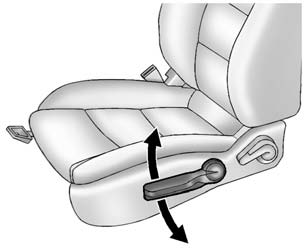
If available, move the lever up or down to manually raise or lower the seat.
 Front Seats
...
 Reclining Seatbacks
Warning
If either seatback is not locked, it could move forward in a sudden stop or
crash. That could cause injury to the person sitting there. Always push and pull
on the seatbacks to be sure th ...
Other materials:
Headlamp High/Low-Beam Changer
(Headlamp High/Low-Beam Changer):
Push the turn signal lever away from you to turn the high beams on.
Push the lever again or pull the lever toward you to return to low beams.
This indicator light turns on in the instrument cluster when the high-beam headlamps
are on. ...
Cargo Center Courtesy Lamp Bulb Replacement (Sedan)
Cargo Center Courtesy Lamp Bulb Replacement
Callout
Component Name
1
Rear Compartment Courtesy Lamp
Refer to Rear Compartment Courtesy Lamp Replacement
2
Cargo Lamp Bulb
...
Engine Oil Pressure Indicator Switch Replacement
Engine Oil Pressure Indicator Switch Replacement
Callout
Component Name
Preliminary Procedure
Remove the air conditioning compressor. Refer to Air Conditioning Compressor
Replacement.
1
Oil Pres ...

0.0059