
Chevrolet Sonic Repair Manual: Steering Wheel Adjustment
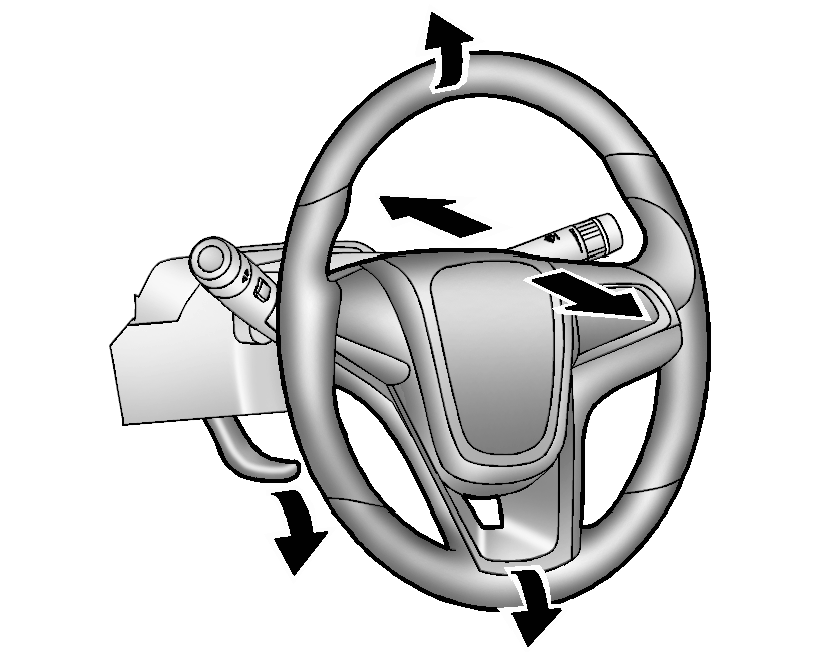
To adjust the steering wheel:
- Pull the lever down.
- Move the steering wheel up, down, forward, and backward.
- Pull the lever up to lock the steering wheel in place.
Do not adjust the steering wheel while driving.
 Driver Information Center (DIC)
The DIC displays information about your vehicle. It also displays warning messages
if a system problem is detected. See Vehicle Messages. All messages appear in the
DIC display in the instrument c ...
 Vehicle Personalization
Personalization Menu (Radio without Touchscreen)
Use the audio system controls to access the personalization menus for customizing
vehicle features.
The following are all possible perso ...
Other materials:
Locking with power door lock switch
Driver's armrest
Front passenger's armrest
Basic information
The Nissan Armada power door lock system allows centralized locking and unlocking
of all doors using switches located on both the driver’s and front passenger’s doors.
To lock all doors, press the switch to the lo ...
Intelligent Cruise Control (ICC)
Basic information
The Intelligent Cruise Control (ICC) system in the Nissan Armada is an integral
component of the advanced ProPILOT Assist suite. Before using this feature, it is
strongly recommended to carefully review the entire ProPILOT Assist section to fully
understand system operation, ...
Sonar system limitations
WARNING
The following limitations apply to the Nissan Armada sonar system. Failure
to understand and follow these limitations may result in serious injury or even
fatal accidents.
Carefully review all limitations of the Nissan Armada sonar system. Environmental
conditions such as heavy r ...

0.0058