
Chevrolet Sonic Owner's Manual: Steering Wheel Controls
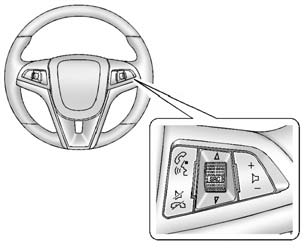
Some audio steering wheel controls could differ depending on the vehicle's options. Some audio steering wheel controls can be adjusted at the steering wheel.
 /
/
 : Press to interact with the available
Bluetooth or OnStar systems.
 /
/
 : Press to decline an incoming call,
to end speech recognition, or to end a current call. Press to silence the vehicle
speakers while using the infotainment system. Press again to turn the sound on.
For vehicles with OnStar or Bluetooth systems, press to reject an incoming call, or end a current call.
 SRC
SRC
 : Press to select an audio source.
Toggle up or down to select the next or previous favorite radio station or CD/MP3 track.
+  −: Press + or − to increase or
decrease the volume.
See Steering Wheel Controls.
 Bluetooth
The Bluetooth® system allows users with a Bluetooth-enabled mobile phone to make
and receive hands-free calls using the vehicle audio system and controls.
The Bluetooth-enabled mobile phone must b ...
 Cruise Control
: Press to turn the cruise control
system on and off.
RES/+: Move the thumbwheel up briefly to make the vehicle resume to a previously
set speed or hold upwards to accelerate. If cruise contro ...
Other materials:
How to Reset the Engine Oil Life System
Reset the system whenever the engine oil is changed so that the system can calculate
the next engine oil change. To reset the system:
1. Press the MENU button to show Remaining Oil Life on the display. This display
shows an estimate of the oil’s remaining useful life. If 99% is displayed, tha ...
Engine Oil Cooler Replacement
Removal Procedure
Disconnect battery negative cable. Refer to Battery Negative Cable Disconnection
and Connection.
Drain engine coolant. Refer to Cooling System Draining and Filling
Remove the turbocharger oil feed pipe. Refer to Turbocharger Oil Feed
Pipe Replacement ...
Transmission Replacement (With 1.2L or 1.4L Engine)
Removal Procedure
Remove the battery tray. Refer to
Battery Tray Replacement.
Without draining the coolant or removing the hoses,
remove and position aside the radiator surge tank. Refer to
Radiator Surge Tank Replacement.
Remove the transmission range selector lever c ...

0.0059