
Chevrolet Sonic Owner's Manual: Cruise Control
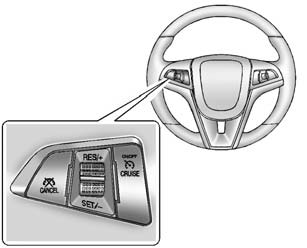
 : Press to turn the cruise control
system on and off.
RES/+: Move the thumbwheel up briefly to make the vehicle resume to a previously set speed or hold upwards to accelerate. If cruise control is already active, use to increase vehicle speed.
SET/−: Move the thumbwheel down briefly to set the speed and activate cruise control. If cruise control is already active, use to decrease speed.
 : Press to disengage cruise control
without erasing the set speed from memory.
See Cruise Control.
 Steering Wheel Controls
Some audio steering wheel controls could differ depending on the vehicle's options.
Some audio steering wheel controls can be adjusted at the steering wheel.
/
: Press to interact with the ...
 Driver Information Center (DIC)
The DIC display is in the instrument cluster. It shows the status of many vehicle
systems. The controls for the DIC are on the turn signal lever.
1. SET/CLR: Press to set or clear the menu item d ...
Other materials:
Leaving the Vehicle with the Engine Running (Automatic Transmission)
Warning
It can be dangerous to leave the vehicle with the engine running. It could
overheat and catch fire.
It is dangerous to get out of the vehicle if the shift lever is not fully
in P (Park) with the parking brake firmly set. The vehicle can roll.
Do not leave the vehicle when the engine i ...
Heater Core Replacement
Heater Core Replacement
Callout
Component Name
Preliminary Procedures
Remove the Heater and Air Conditioning Evaporator and Blower Module.
Refer to Heater and Air Conditioning Evaporator and Blower Module Removal
and Inst ...
Manual Transmission Shift Lever and Selector Lever Cable Replacement
Removal Procedure
Remove the battery tray. Refer to
Battery Tray Replacement.
\i
Disconnect the shift lever and selector cable ends (1)
from the transmission shift lever and selector levers.
Pull the cable retainers (2) to release the shift
leve ...

0.0054