
Chevrolet Sonic Repair Manual: Timing Belt Rear Cover Installation
- Re-cut the 4 rear timing belt cover threads.
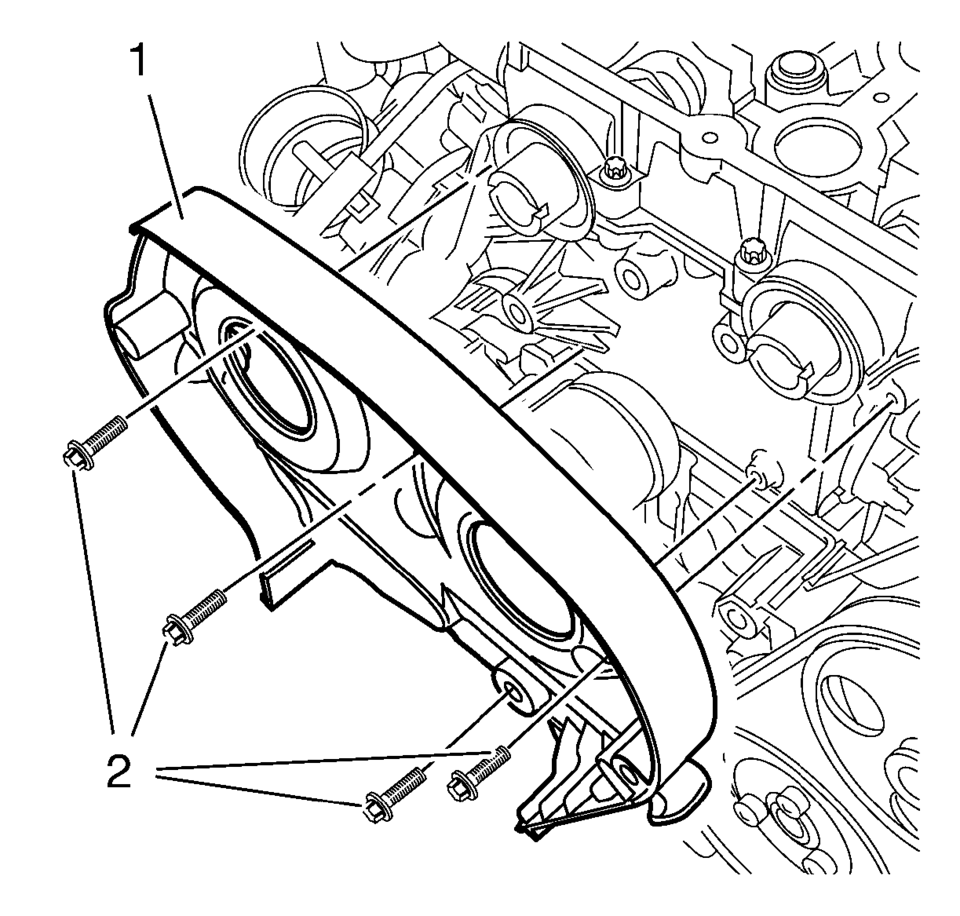
- Install the timing belt rear cover (1).
- Install the 4 NEW timing belt rear cover bolts (2) and tighten to 6 Y
(53 lb in)
.
Caution:
Refer to Fastener Caution.
Note:
Service may offer bolts that are not microencapsulated. If this is the case apply thread lock agent to the bolt. If fastener is microencapsulated, install a NEW 4 timing belt rear cover bolts. DO NOT reuse the old bolt.
 Timing Belt Lower Front Cover Replacement
Timing Belt Lower Front Cover Replacement
Callout
Component Name
Preliminary Procedures
Remove the front wheelhouse liner inner fro ...
 Timing Belt Rear Cover Removal
Remove and DISCARD the 4 timing belt rear cover bolts (2).
Remove the timing belt rear cover (1).
...
Other materials:
Fuel Gauge
The fuel gauge indicates about how much fuel is left when the ignition is turned
to ON/RUN.
When the tank nears empty, the low fuel warning light will come on. There is
still a little fuel left, but the vehicle's fuel tank should be filled soon. See
Low Fuel Warning Light for more ...
Fog Lamps
For vehicles with front fog lamps, the button is on the outboard side of the
instrument panel.
The ignition must be on to turn on the fog lamps.
(Fog Lamps): Press to turn the
fog lamps on or off. An indicator light on the instrument cluster comes on when
the fog lamps are on.
The fog la ...
Fuel Injection Fuel Rail Assembly Replacement
Removal Procedure
Disconnect battery negative cable. Refer to Battery Negative Cable Disconnection
and Connection.
Remove engine cover. Refer to Engine Cover Replacement.
Remove the fuel feed pipe from fuel injection fuel rail. Refer to Fuel
Feed Pipe Replacement.
Re ...

0.0054