
Chevrolet Sonic Repair Manual: Timing Belt Rear Cover Removal
- Remove and DISCARD the 4 timing belt rear cover bolts (2).
- Remove the timing belt rear cover (1).
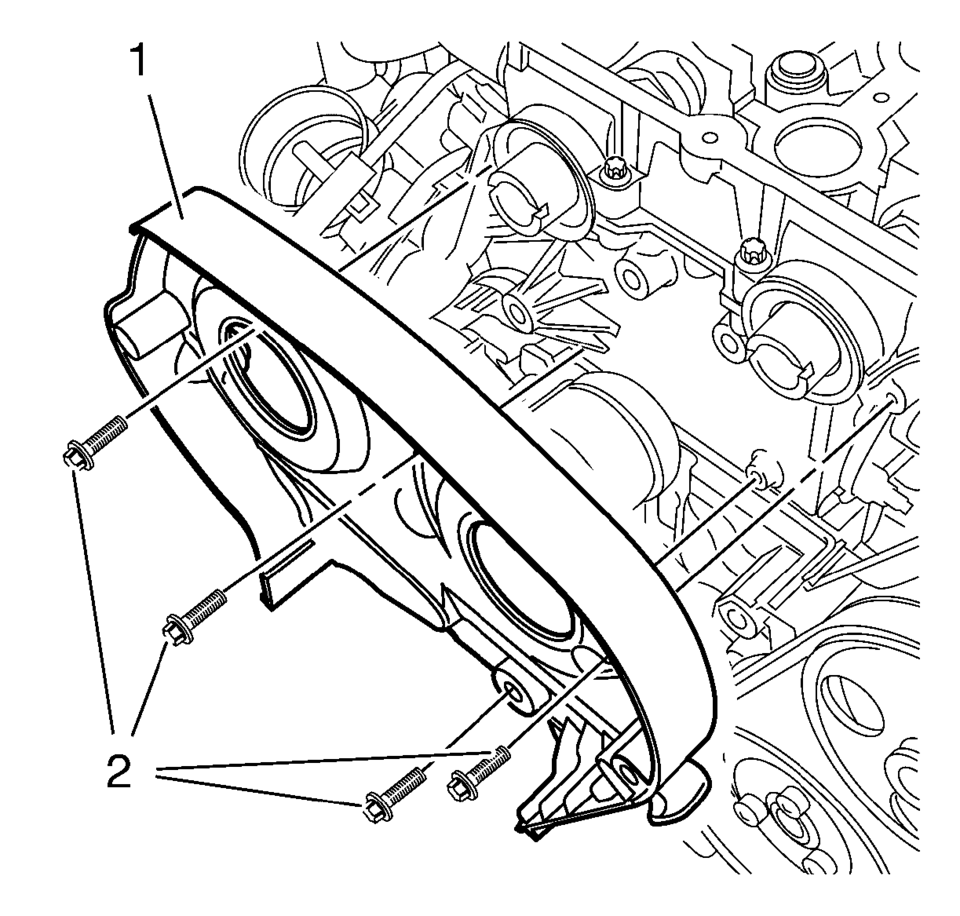
 Timing Belt Rear Cover Installation
Re-cut the 4 rear timing belt cover threads.
Install the timing belt rear cover (1).
Caution: Refer to Fastener Caution.
Note: Service may offer bolts that are n ...
 Timing Belt Rear Cover Replacement
Timing Belt Rear Cover Replacement
Callout
Component Name
Preliminary Procedures
Remove the camshaft sprocket. Refer to Camshaf ...
Other materials:
Rear Safety Belt Comfort Guides
Rear safety belt comfort guides may provide added safety belt comfort for older
children who have outgrown booster seats and for some adults. When installed on
a shoulder belt, the comfort guide positions the shoulder belt away from the neck
and head.
Safety belt comfort guides are available ...
Roof Front Header Panel Replacement
Removal Procedure
Warning: Refer to Approved Equipment for Collision Repair
Warning.
Note: The roof front header panel is made of Ultra High Strength
Steel and should be replaced only at factory joints. Repairing or sectioning
of this part is not recomme ...
Shift Fork Cleaning and Inspection (Gen 2)
Warning: Wear safety glasses to avoid injury when using compressed
air or any cleaning solvent. Bodily injury may occur if fumes are inhaled
or if skin is exposed to chemicals.
Clean the following components with a suitable solvent.
Air dry all the parts.
3rd and ...

0.0079