
Chevrolet Sonic Repair Manual: Wireless Communication Interface Antenna Replacement
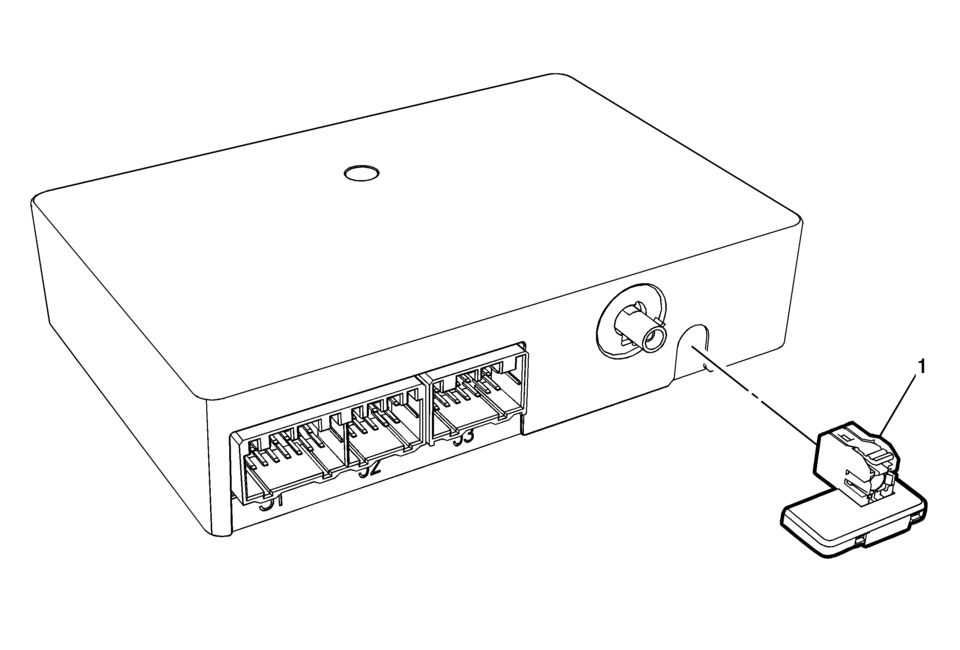
|
Callout |
Component Name |
|---|---|
|
Preliminary Procedure
Remove the communication interface module. Refer to Communication Interface Module Replacement |
|
|
1 |
Wireless Communication Interface Antenna Bluetooth Module Procedure
Unsnap the Antenna from Communication Module. |
 Special Tools (MIT Tool Instructions)
Bluetooth Pairing for Vehicles with
Radio RPO: UF7
Either reset the pin code on the radio to 0000, or go under Device Info on
the radio and see what the pin code is (to enter it later o ...
 Audio
Audio
...
Other materials:
Rear Side Door Upper Hinge and Lower Hinge Replacement
Rear Side Door Upper Hinge and Lower Hinge Replacement
Callout
Component Name
1
Rear Side Door Upper Hinge to Body Bolts (Qty:?€‰2)
Caution: Refer to Fastener Caution.
Procedures
Before removing t ...
Front Floor Console Cover Replacement (Automatic Transmission)
Front Floor Console Cover Replacement
Callout
Component Name
1
Front Floor Console Cover Assembly
Procedures
Apply the parking brake.
Move the shifter from ?€?Park?€? to the ?€?Neutral?€? position.
...
Camshaft Replacement
Special Tools
EN-422 Installer
For equivalent regional tools, refer to Special Tools.
Removal Procedure
Note: Take extreme care to prevent any scratches, nicks or
damage to the camshafts and caps bearing surfaces.
Remove the timing belt rear cover ( ...

0.0061