
Chevrolet Sonic Repair Manual: Audio Disc Player and USB Receptacle Replacement
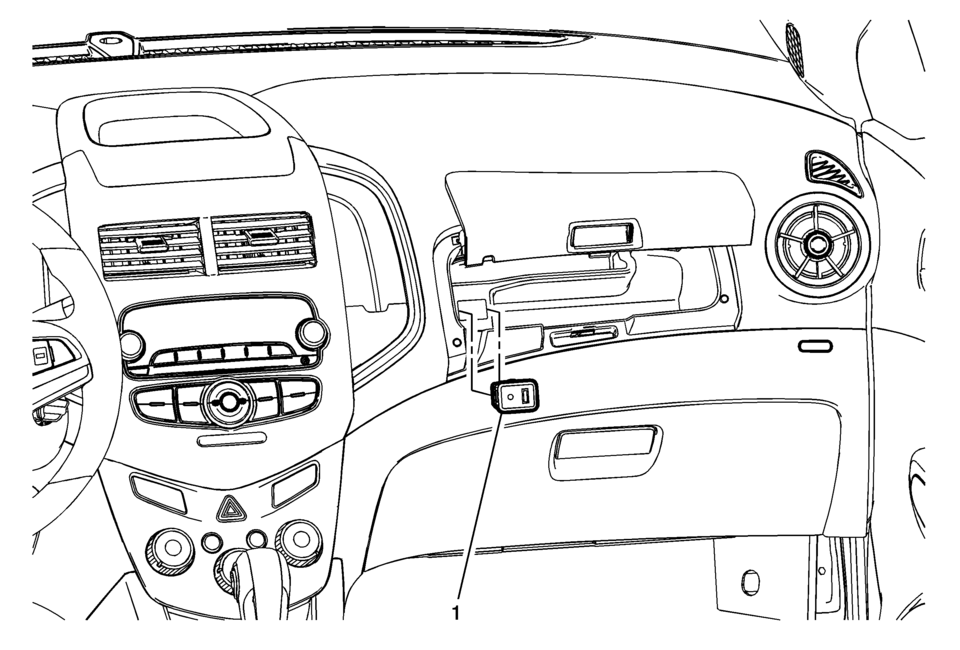
|
Callout |
Component Name |
|---|---|
|
1 |
Audio Disc Player and USB Receptacle Procedure
|

 Bluetooth (Overview)
For vehicles equipped with Bluetooth capability, the system can interact with
many cell phones, allowing:
Placement and receipt of calls in a hands-free mode.
Sharing of the cell phone’s ad ...
Other materials:
Rear Side Door Replacement
Rear Side Door Replacement
Callout
Component Name
Warning: Refer to SIR Warning.
Preliminary Procedures
Mark the location of the hinge before removing the bolts with a
grease pencil.
Remove the rear door ...
Oil Pan Replacement
Special Tools
EN-49980 Guidance Pins
For equivalent regional tools, refer to Special Tools.
Removal Procedure
Remove the right front wheelhouse liner extension. Refer to Front Wheelhouse
Liner Inner Front Extension Replacement.
Remove the oil filter and drain the engine oi ...
Automatic Transmission Shift Lock Control Function Check
Warning: When you are doing this inspection, the vehicle could move
suddenly. If the vehicle moves, you or others could be injured.
Before starting this check, be sure there is enough room
around the vehicle. It should be parked on a level surface.
Apply the parking brake. Be read ...

0.0054