
Nissan Armada 2025-2026 Owner's Manual: Basic information
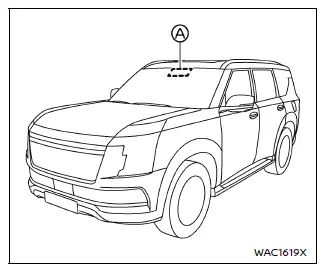
The Nissan Armada Traffic Sign Recognition (TSR) system is designed to enhance driver awareness by identifying and displaying the most recently detected road signs, particularly speed limits. Using the advanced multi-sensing front camera unit positioned near the interior mirror, the Nissan Armada captures real-time road sign data and presents it clearly in the vehicle information display.
For Nissan Armada models equipped with a navigation or map locator system, the displayed speed limit may be determined by combining live camera input with digital map data, ensuring greater accuracy. TSR information can be viewed both in the vehicle information display and in the Head-Up Display (HUD), if available, allowing drivers to stay informed without diverting attention from the road.
WARNING
The Nissan Armada TSR system is intended as a driver support feature only. It does not replace the driver's responsibility to observe road conditions, traffic signs, or driving regulations. The system cannot prevent accidents caused by inattention or unsafe driving behavior. Always remain alert and drive responsibly.

 System operation
The Nissan Armada TSR system is capable of recognizing and displaying key traffic
signs, including the following:
Latest detected speed limit
No passing zone indication
CAUTION
...
Other materials:
Service Publications Ordering Information
Service Manuals
Service Manuals have the diagnosis and repair information on the engines, transmission,
axle, suspension, brakes, electrical, steering, body, etc.
Service Bulletins
Service Bulletins give additional technical service information needed to knowledgeably
service General Motors c ...
Brake Rotor Assembled Lateral Runout Correction - Indexing
Special Tools
CH-45101-100 Conical Brake Rotor Washers
For equivalent regional tools, refer to Special Tools.
Warning: Refer to Brake Dust Warning.
Note:
Brake rotor thickness variation MUST be checked BEFORE checking
for assembled lateral runout (LRO). Thi ...
Tire and Wheel Assembly Balancing - On-Vehicle
Special Tools
EL-38792-A Electronic Vibration Analyzer (EVA) 2
If after following the tire and wheel vibration diagnostic process, some amount
of tire and wheel vibration is still evident, an on-vehicle high-speed spin balancer
may be used to perform an on-vehicle balance in an attempt ...

0.0062