
Nissan Armada 2025-2026 Owner's Manual: Basic information
WARNING
Incorrect use of the Nissan Armada AEB with Pedestrian Detection system can lead to serious injury or fatal accidents.
- The Nissan Armada AEB system is designed as an additional safety feature and does not replace attentive and responsible driving. The driver must always remain alert to surrounding traffic conditions.
- This system may not operate in all scenarios and cannot prevent every possible collision due to environmental, traffic, or operational limitations.
The Nissan Armada Automatic Emergency Braking (AEB) with Pedestrian Detection system is designed to support the driver by helping to mitigate or avoid frontal collisions in specific scenarios, including:
- Vehicles traveling ahead in the same lane
- Pedestrians moving within or entering the driving path
- Cyclists detected ahead of the vehicle
In addition, the Nissan Armada includes Intersection Assist, which enhances safety when making turns by detecting potential hazards:
- When turning left or right across the path of an oncoming vehicle
- When a pedestrian is detected crossing into the vehicle’s intended path during a turn
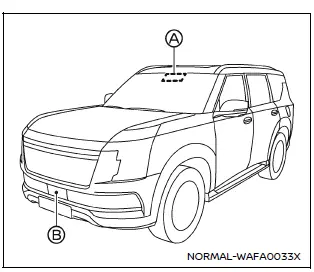
Example
The Nissan Armada AEB system uses a forward-mounted radar sensor B to continuously monitor the distance and relative speed of vehicles ahead within the same lane.
For improved detection of pedestrians and cyclists, the Nissan Armada combines radar data with input from a forward-facing camera A mounted behind the windshield. This integrated approach allows for more accurate object recognition and quicker response times in potentially hazardous situations.
Additional recommendation: To maintain optimal performance of the Nissan Armada AEB system, always ensure that sensors and cameras are clean, unobstructed, and functioning correctly, and never rely solely on automated systems without active driver supervision.

 Turning the AEB with Pedestrian Detection system ON/OFF
AEB system OFF warning light (on the meter panel)
Vehicle information display
Steering-wheel-mounted controls (right side)
In the Nissan Armada, the Automatic Emergency Braking (AEB) wit ...
Other materials:
Turn and Lane-Change Signals
Move the lever all the way up or down to signal a turn.
An arrow on the instrument cluster will flash in the direction of the turn or
lane change.
Raise or lower the lever until the arrow starts to flash to signal a lane change.
Hold it there until the lane change is completed. If the lever ...
Communication Interface Module Replacement
Communication Interface Module Replacement
Callout
Component Name
Preliminary Procedure
Remove the instrument panel lower compartment.
Refer to Instrument Panel Lower Compartment
Replacement.
Remove the instrument pa ...
Special Tools (MIT Tool Instructions)
Bluetooth Pairing for Vehicles with
Radio RPO: UF7
Either reset the pin code on the radio to 0000, or go under Device Info on
the radio and see what the pin code is (to enter it later on the MIT).
Turn the BT discoverable ON in the radio Bluetooth
settings.
Press Pair De ...

0.0067