
Nissan Armada 2025-2026 Owner's Manual: Turning the AEB with Pedestrian Detection system ON/OFF
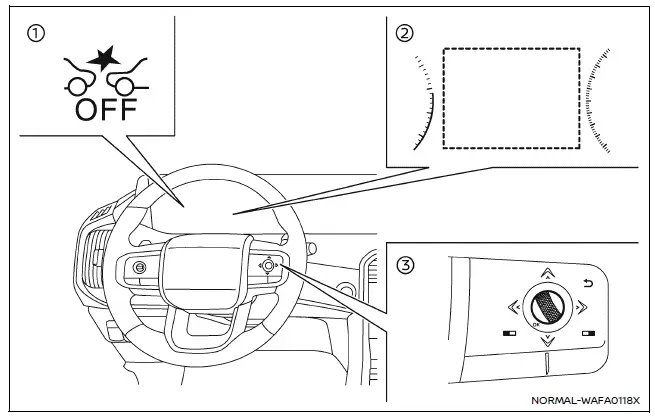
- AEB system OFF warning light (on the meter panel)
- Vehicle information display
- Steering-wheel-mounted controls (right side)
In the Nissan Armada, the Automatic Emergency Braking (AEB) with Pedestrian Detection system can be enabled or disabled through the vehicle information display. This allows the driver to manage advanced safety features according to driving conditions and preferences.
Follow these steps to turn the Nissan Armada AEB with Pedestrian Detection system ON or OFF:
1. Press the
 button repeatedly until the "Settings" menu appears on the vehicle information display,
then press the scroll dial to confirm.
button repeatedly until the "Settings" menu appears on the vehicle information display,
then press the scroll dial to confirm.
Use the scroll dial to navigate to "Driver Assistance," and press the dial again to enter the submenu.
2. Select "Emergency Brake" and press the scroll dial to toggle the Nissan Armada AEB system ON or OFF.
When the Nissan Armada AEB with Pedestrian Detection system is switched OFF, the AEB OFF warning indicator will illuminate on the instrument cluster to inform the driver.
NOTE:
- The Nissan Armada AEB with Pedestrian Detection system automatically reactivates when the engine is restarted, ensuring safety features are restored for every drive.
- The Intelligent Forward Collision Warning (I-FCW) system is integrated with the AEB system in the Nissan Armada. Disabling AEB will also disable the I-FCW system, as they function together as part of the same safety architecture.
- The Nissan Armada does not allow activation or deactivation of the AEB system while the vehicle is in motion. Adjustments must be made when the vehicle is stationary.
Additional recommendation: For maximum safety in the Nissan Armada, it is strongly advised to keep the AEB with Pedestrian Detection system enabled at all times unless specific conditions require temporary deactivation.
 Basic information
WARNING
Incorrect use of the Nissan Armada AEB with Pedestrian Detection system can
lead to serious injury or fatal accidents.
The Nissan Armada AEB system is designed as an additional safety f ...
 AEB with Pedestrian Detection system limitations
WARNING
The Nissan Armada AEB with Pedestrian Detection system includes important
operational limitations. Failure to understand and follow these limitations when
driving the Nissan Armada may re ...
Other materials:
Rear Side Door Opening Floor Carpet Retainer Replacement
Rear Side Door Opening Floor Carpet Retainer Replacement
Callout
Component Name
Preliminary Procedure
Remove the rear seat cushion. Refer to Rear Seat Cushion Removal and
Installation.
1
Rear Si ...
Special Tools
Illustration
Tool Number/ Description
CH-24319-B
CH-43631
J-24319-B
J-43631
Ball Joint Remover
CH-50559
Wheel Hub / Bearing Remover / Installer Kit
CH-5 ...
Plastic Collar Quick Connect Fitting Service
Removal Procedure
Warning: Refer to Gasoline/Gasoline Vapors
Warning.
Note: There are several types of plastic collar fuel and evaporative
emission quick connect fittings used on this vehicle.
Bartholomew (1)
Q Release (2)
Squeeze to ...

0.0055