
Nissan Armada 2025-2026 Owner's Manual: AEB with Pedestrian Detection system limitations
WARNING
The Nissan Armada AEB with Pedestrian Detection system includes important operational limitations. Failure to understand and follow these limitations when driving the Nissan Armada may result in serious injury or even fatal consequences.
- The Nissan Armada AEB with Pedestrian Detection system is not capable of identifying every vehicle, pedestrian, or cyclist in all driving scenarios and environmental conditions.
- The Nissan Armada AEB system does not detect the following:
- Small pedestrians (such as children), individuals sitting, riding toys, skateboards, scooters, wheelchairs, or those not in a typical upright walking or standing posture.
- Animals of any size or type.
- Stationary or loose obstacles such as cargo, debris, or roadside objects.
- Vehicles crossing your path from the side.
- Vehicles with unclear rear shapes, hidden tires, or partially obstructed outlines.
- Parked vehicles under certain conditions.
- The Nissan Armada AEB with Pedestrian Detection system has performance
limits:
- If approaching a stationary vehicle at speeds above approximately 50 MPH (80 km/h), the system may not activate.
- Pedestrian and cyclist detection is limited above approximately 50 MPH (80 km/h) and below approximately 6 MPH (10 km/h).
- The Nissan Armada AEB system may fail to operate correctly in the following
conditions:
- Reduced visibility such as heavy rain, snow, fog, dust, smoke, or water spray.
- Obstruction of sensors or camera by dirt, ice, snow, or condensation.
- Strong light interference (sun glare, high beams) or sudden lighting changes (tunnels, lightning).
- Low-light environments such as nighttime or tunnels, especially when lights are insufficient.
- Camera misalignment or incorrect positioning.
- Driving on steep inclines, sharp curves, uneven or unpaved roads.
- External radar interference.
- Rapid vehicle movement such as sudden lane changes, sharp steering, or abrupt acceleration/deceleration.
- Quick or unpredictable movements of other vehicles, pedestrians, or cyclists.
- Targets located outside the direct forward path of the Nissan Armada.
- Minimal speed difference between vehicles.
- Pedestrians partially hidden or difficult to recognize (e.g., carrying objects, wearing loose clothing, unusual posture).
- Poor contrast between a pedestrian and background environment.
- Immediately after engine start or within approximately 15 seconds.
- Vehicles with unusual shapes, extreme height differences, or narrow profiles (such as motorcycles).
- Objects near reflective surfaces, shadows, or traffic signs.
- Groups of pedestrians or cyclists.
- Obstructed view due to other vehicles or objects.
- While towing with the Nissan Armada.
- System performance of the Nissan Armada AEB may decrease under the following
conditions:
- Driving on slippery surfaces.
- Driving on steep slopes.
- Heavy load in the rear seats or cargo area affecting vehicle balance.
- The Nissan Armada system performs automatic sensor diagnostics, but may not detect all obstructions such as ice, stickers, or debris. Regular inspection and cleaning of sensor areas is essential.
- Under certain traffic conditions, the Nissan Armada AEB system may apply partial braking unexpectedly. If acceleration is required, press the accelerator pedal to override the system.
- The system may activate due to objects, shadows, or lighting conditions that resemble vehicles, pedestrians, or cyclists.
- The Nissan Armada AEB system may continue operating when a vehicle ahead is turning.
- The system may activate while overtaking another vehicle.
- Depending on road geometry (curves, construction zones, lane changes), the Nissan Armada AEB system may temporarily respond to vehicles ahead.
Additional recommendation: For optimal safety in the Nissan Armada, always maintain full driver awareness and treat the AEB with Pedestrian Detection system as a supportive feature rather than a substitute for attentive driving.
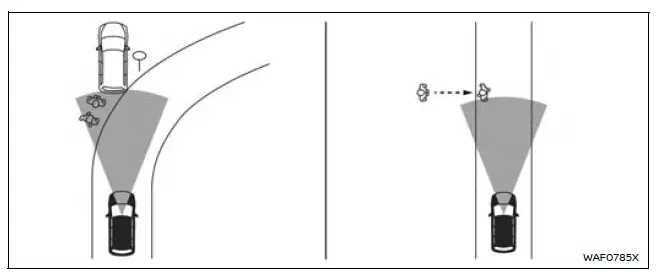
WARNING
- The Nissan Armada AEB with Pedestrian Detection system may unintentionally
respond to a variety of surrounding elements. Drivers of the Nissan Armada must
remain attentive at all times and not rely solely on the system.
- Objects located along the roadside such as traffic signs, guardrails, pedestrians, cyclists, motorcycles, or nearby vehicles.
- Pedestrians or cyclists encountered while driving through narrow streets, alleys, or confined urban environments.
- Pedestrians or cyclists who briefly enter or move toward the driving lane to avoid obstacles at the road edge.
- Overhead structures or objects such as low bridges, hanging signs, or similar elements above the roadway.
- Surface-level objects including railroad tracks, drainage grates, metal plates, or uneven road features.
- Structural elements inside parking garages such as beams, pillars, or low-clearance components.
- Pedestrians, cyclists, or motorcycles approaching the driving lane from nearby positions.
- Vehicles, pedestrians, cyclists, motorcycles, or objects located in adjacent lanes or close proximity to the Nissan Armada.
- Individuals approaching from the front or side who may trigger system detection.
- Natural roadside objects such as trees or vegetation that may resemble obstacles.
- When driving the Nissan Armada on slippery or low-traction surfaces, braking distances will increase significantly, even with AEB assistance.
- High ambient noise levels (for example, loud audio systems or open windows) may prevent the driver from hearing important warning chimes generated by the Nissan Armada safety systems.
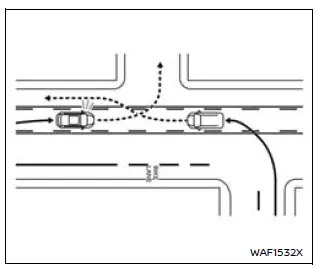
WARNING
- The Intersection Assist feature in the Nissan Armada does not apply braking to vehicles approaching directly toward your vehicle. The driver must remain fully responsible for monitoring traffic conditions and reacting appropriately.
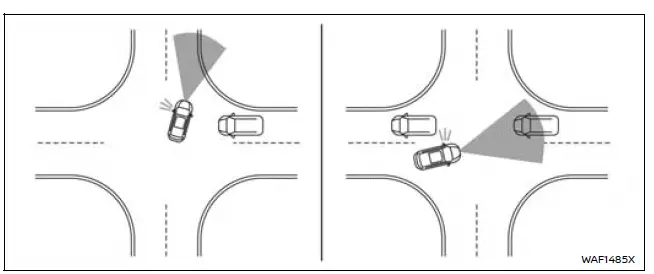
In the intersection) After turning left/Approaching vehicles in a row
Additional note: When operating the Nissan Armada in complex environments such as intersections, urban streets, or parking areas, always combine system assistance with careful visual checks to ensure maximum safety and control.
WARNING
In addition to the general limitations associated with the Nissan Armada AEB with Pedestrian Detection system, there are specific restrictions that apply when the Intersection Assist feature is active. Drivers of the Nissan Armada must clearly understand these limitations, as improper reliance on the system may lead to serious injury or even fatal consequences.
- The Nissan Armada Intersection Assist system may fail to detect approaching
vehicles or pedestrians under certain driving conditions, including but not
limited to:
- When turning left or right across multiple lanes where approaching vehicles are separated by more than two lanes from the Nissan Armada.
- When the Nissan Armada is not aligned directly toward the path of an approaching vehicle during a turning maneuver.
- When the turn has already been initiated and the system has limited time to identify new approaching hazards.
- During sharp turns or when navigating wide-radius curves where detection angles are reduced.
- When lane markings, including the center line, are unclear, faded, or not properly recognized by the system sensors.
- When multiple vehicles are approaching consecutively in a closely spaced sequence, making it difficult for the Nissan Armada system to distinguish each object accurately.
- When driving in lanes that are significantly wider or narrower than standard lane dimensions.
- When the center line is positioned very close to road markings or other visual elements, potentially confusing the system.
- The Nissan Armada Intersection Assist feature may activate automatic braking even in situations where the risk of collision appears minimal. This is part of the system’s preventive safety logic.
- The system may also initiate braking when the movement of an approaching vehicle cannot be accurately predicted, such as during sudden lane changes, unexpected turns, or abrupt deceleration of other vehicles near the Nissan Armada.
Additional note: When driving the Nissan Armada through intersections, always maintain full situational awareness and be prepared to override system inputs. Advanced driver assistance systems are designed to support, not replace, responsible driving behavior.
 Turning the AEB with Pedestrian Detection system ON/OFF
AEB system OFF warning light (on the meter panel)
Vehicle information display
Steering-wheel-mounted controls (right side)
In the Nissan Armada, the Automatic Emergency Braking (AEB) wit ...
 System temporarily unavailable
While operating the Nissan Armada, certain road environments such as winding
mountain routes, steep inclines, sharp curves, narrow lanes, or areas under construction
can temporarily affect the ...
Other materials:
Instrument Panel Compartment Door Dampener Replacement
Instrument Panel Compartment Door Dampener Replacement
Callout
Component Name
Preliminary Procedure
Remove the instrument panel lower compartment. Refer to Instrument Panel
Lower Compartment Replacement.
1 ...
Ignition Coil Removal
Special Tools
EN-6009 Remover and Installer Ignition Module
For equivalent regional tools, refer to Special Tools.
Remove the 2 ignition coil bolts (1).
Install EN-6009 remover and installer (2) and remove the ignition
coil (1).
...
Meters and gauges
Example
The Nissan Armada instrument cluster provides clear and precise vehicle data,
allowing drivers to monitor performance, efficiency, and safety indicators in real
time. This ensures confident driving in all conditions.
Tachometer
Drive Mode Selector indicator*
Automatic Transm ...

0.006