
Nissan Armada 2025-2026 Owner's Manual: Basic information
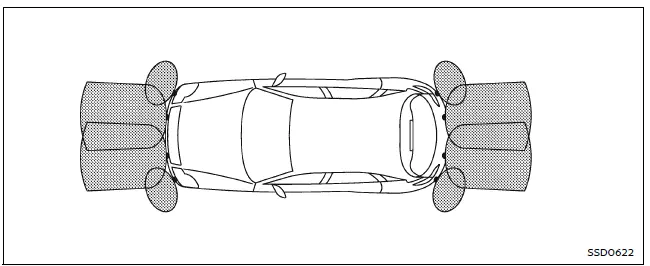
The front and rear sonar system in the Nissan Armada is designed to assist the driver during parking and low-speed maneuvers by detecting obstacles around the vehicle. Using ultrasonic sensors integrated into the front and rear bumpers, the Nissan Armada provides audible tones and visual indicators to alert the driver of nearby objects.
When the sonar system is activated in the Nissan Armada, a dedicated sonar view automatically appears in the vehicle information display, giving the driver a clearer understanding of the surrounding environment.
WARNING
- The Nissan Armada sonar system is intended as a convenience feature and must not be relied upon as a substitute for careful and attentive driving during parking or maneuvering.
- The driver of the Nissan Armada is always responsible for ensuring safety. Always visually check surroundings and confirm it is safe before moving the vehicle.
- Fully understand the operational limitations of the Nissan Armada sonar system. The indicator colors represent different distances to detected obstacles and should be interpreted correctly.
- External factors such as severe weather conditions or ultrasonic interference from sources like automatic car washes, air brake systems, or construction tools may affect system performance or cause false alerts.
- The Nissan Armada sonar system is designed to help detect larger stationary objects to minimize the risk of vehicle damage.
- The system may not detect small, moving, or low-lying objects. Objects below the bumper or very close to it may not be recognized. Always proceed slowly and cautiously.
- Certain materials and object shapes—such as soft surfaces (snow, cloth), thin items (wire, rope), or angled structures—may not reflect sound waves effectively and can go undetected by the Nissan Armada sonar sensors.
- The system measures distance using reflected sound waves. Strong surrounding noises or ultrasonic signals from other vehicles may interfere with detection accuracy.
If the Nissan Armada bumper is damaged, misaligned, or deformed, the sonar detection range may be affected, potentially resulting in inaccurate readings or false warnings.
CAUTION
- Loud background noise, such as high audio volume or open windows, may make it difficult to hear the sonar warning tones in the Nissan Armada.
- Ensure that the sonar sensors on the Nissan Armada bumpers remain clean and free of snow, ice, or dirt. Avoid using sharp tools when cleaning, as this may damage the sensors and reduce system accuracy.

 System operation
The Nissan Armada sonar system provides both visual and audible alerts under
the following conditions:
Detection of front obstacles when the transmission is in D (Drive)
Detection of both fron ...
Other materials:
Rear Seat Latch Replacement
Rear Seat Latch Replacement
Callout
Component Name
Preliminary Procedures
Remove the rear seat back cushion. Refer to Rear Seat Back Cushion
Removal and Installation.
Remove the rear seat back cushion cover and pad. Refer ...
Exhaust Camshaft Removal
Remove the camshaft bearing cap bolts in a spiral sequence as shown one
turn at a time until there is no spring tension pushing on the camshaft.
Note: Mind the markings on the camshaft bearing caps to ensure
they will be installed in the same position.
Remove the ...
Audible reminders
Light reminder chime
The Nissan Armada emits a light reminder chime if the headlights are left on
after the engine has been turned off and the driver’s door is opened. This helps
prevent battery discharge. The sound occurs when the switch remains in the
or
position.
To avoid unnecess ...

0.0048