
Nissan Armada 2025-2026 Owner's Manual: System operation
The Nissan Armada sonar system provides both visual and audible alerts under the following conditions:
- Detection of front obstacles when the transmission is in D (Drive)
- Detection of both front and rear obstacles when the transmission is in R (Reverse)
How the system alerts of obstacles:
The Nissan Armada sonar system automatically deactivates at speeds above approximately 6 MPH (10 km/h) and reactivates when the vehicle slows down.
The intermittent warning tone will stop a few seconds after the distance to a stationary object stabilizes or when the object is no longer detected.
When an obstacle is first detected, a green indicator appears and blinks while an intermittent tone sounds. As the Nissan Armada approaches the object, the indicator changes to yellow and the tone frequency increases. When the vehicle is very close, the indicator turns red and remains steady, accompanied by a continuous warning tone.
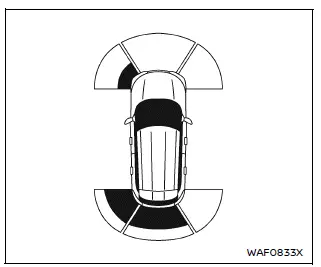
Example
As the Nissan Armada moves closer to an obstacle, the sonar detection area is displayed in the vehicle information screen, providing clear visual guidance.
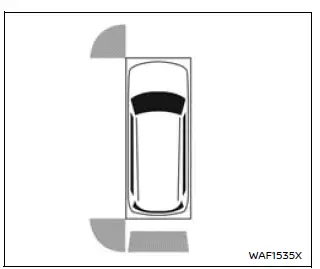
Example
The sonar indicators are also integrated into the camera view on the Nissan Armada touchscreen display, enhancing driver awareness and making parking and maneuvering more precise and confident.
 Basic information
The front and rear sonar system in the Nissan Armada is designed to assist the
driver during parking and low-speed maneuvers by detecting obstacles around the
vehicle. Using ultrasonic sensors ...
 How to enable/disable the sonar system
Vehicle information display
Steering-wheel-mounted control (right side)
The Nissan Armada sonar system is automatically activated when the ignition is
in the ON position and the transm ...
Other materials:
Tire Designations
Tire Size
The following is an example of a typical passenger vehicle tire size.
(1) Passenger (P-Metric) Tire: The United States version of a metric tire sizing
system. The letter P as the first character in the tire size means a passenger vehicle
tire engineered to standards set by the U.S. ...
Tire Pressure
Tires need the correct amount of air pressure to operate effectively.
Caution
Neither tire underinflation nor overinflation is good. Underinflated tires,
or tires that do not have enough air, can result in:
. Tire overloading and overheating which could lead to a blowout.
. Premature or ir ...
Steering Assist switch
The Steering Assist switch in the Nissan Armada allows the driver to temporarily
enable or disable the Steering Assist function.
Additionally, the system can be controlled through the "Driver Assistance" menu
within the Nissan Armada vehicle information display.
The Nissan Armada ...

0.0052